
UptimeRobot alternative
A UptimeRobot alternative that knows why the site went down
BugOtter checks every app from three regions, gives each a public status page, and shows the outage next to what explains it: the deploy before it, the errors it caused and the visitors and sales it cost. It's built for founders who run their own apps. For plain server monitoring at volume, UptimeRobot is still the cheaper, broader tool.
- 3 regionsper check; 2 must agree it's down
- 1 per apppublic status page
- 10checks per app on Builder

The short version
Fewer false alarms
Three regions check each app, and two must agree after a retry before anyone is woken.The outage, with its cause
The deploy before it, the errors it started and the visitors and sales it cost, on one incident page.UptimeRobot is broader
Ping, port and DNS monitors, SMS and calls, 30-second checks and a free plan. When to pick UptimeRobot.
At a glance
| Feature | UptimeRobot | BugOtter |
|---|---|---|
| Checks | ||
| Fastest check interval | 5 min free, 60 s Solo, 30 s Team, 15 s Scale | every 5 min on Starter, every minute on Builder, every minute on Pro |
| Confirmed from several regions | Check their docs | Yes3 regions, 2 must agree, after a retry |
| HTTP checks with expected text | Yes | YesStatus, text or JSON |
| POST checks with body and headers | Check their docs | Yes |
| Ping, port, DNS, UDP monitors | Yes | No |
| SSL and domain expiry | PartlyPaid plans | YesAll plans |
| Heartbeats for cron jobs | PartlyPaid plans | YesAll plans |
| Status pages | ||
| Status pages | Yes1 free, 3 Solo, 100 Team | YesOne per app |
| Status page on your own domain | YesSolo and up | YesPro |
| Incident updates emailed to subscribers | Check their docs | Yes |
| Maintenance windows | Check their docs | Yes |
| Alerts | ||
| Alert channels | Email, SMS, voice, Slack, Telegram, Discord, Teams, webhooks and more | Telegram, Discord, Slack, email, push |
| SMS and phone calls | Yes | No |
| Beyond uptime | ||
| Traffic, errors and deploys next to the outage | No | Yes |
| What the outage cost | No | YesMissed visitors and sales, estimated |
| Login seats | Yes3 on Team, 5 on Scale | NoNot yet |

Checked Nov 4, 2026 on their own pages: uptimerobot.com/pricing, UptimeRobot terms. Prices are in USD as their pages showed them, and they can change. We re-check every quarter.
What UptimeRobot does well
UptimeRobot is where most of us started, and it's still a great default. It does one job, for a lot of things, cheaply.
- A free plan you can use for business. The pricing page says “good for personal and commercial projects”, and the terms allow any use.
- Many kinds of monitors. HTTP, keyword, ping and port on every plan, and SSL, domain, heartbeat, DNS, API and UDP on paid ones. If you run servers, not just web apps, that matters.
- Every way to wake you. Email, SMS and voice calls, plus Slack, Telegram, Teams, Discord, PagerDuty, Zapier and webhooks, depending on the plan.
- Speed when you need it. 30-second checks on Team, 15-second on Scale.
- Scale. Hundreds of monitors and up to 100 status pages on one account, with white-label pages on Team.
Where BugOtter is different
Fewer false alarms
Every check runs from US East, Europe (Frankfurt) and US West. An app is only called down when at least two regions fail, confirmed by a retry.
A network blip in one place doesn't page you at 3am. When it's real, the alert says which regions confirmed it.
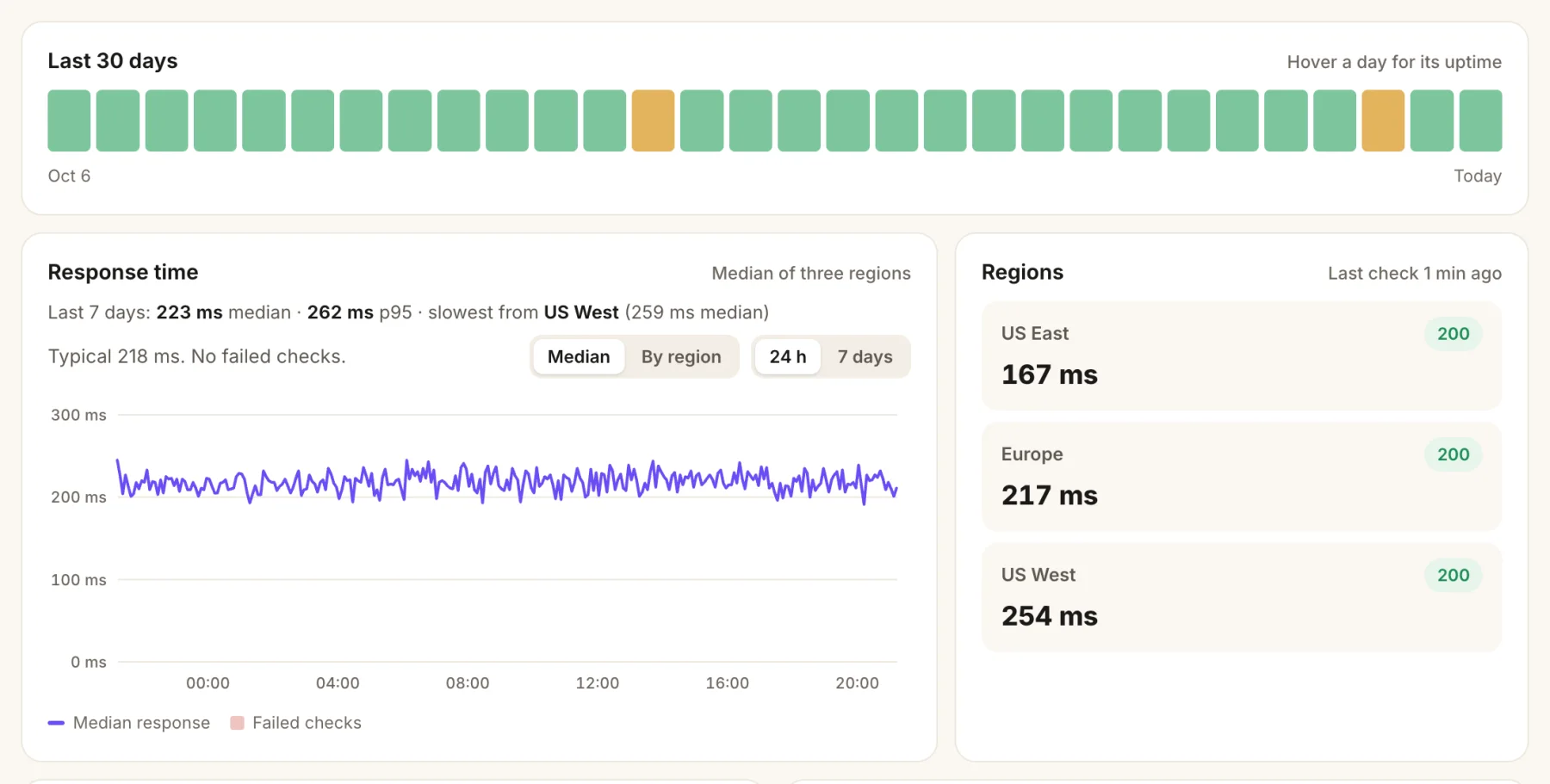
- The last 30 days, one bar a day. Amber marks a day with an incident.
- Response time, the median of the three regions, and which one is slowest.
- Each region's last check: status code and response time.
The outage, with its context
An uptime alert tells you something broke. BugOtter also knows the app's deploys, errors and traffic, so the incident page can show the deploy that went out four minutes before, the new error that started with it, and an estimate of the visitors and sales you missed.
When three of your apps on Vercel go down at once, you get one alert that says it's probably Vercel, with a link to their status page.
Checks that test what matters
Beyond the home page, each app can have more checks (3 on Starter, 10 on Builder, 10 on Pro):
- An API endpoint, or a POST to your login or webhook route with a body and headers.
- An expectation on the status, the text or a value in the JSON.
- Headers are stored encrypted, since they often hold an API key.
Status pages people trust
Each app gets a status page with its uptime history. Write a short note during an incident and it shows on the page and goes by email to everyone who subscribed (double opt-in).
Schedule maintenance and checks keep running, but nothing alerts or counts against uptime. A README badge links to the page.

- One line for visitors: is everything working right now.
- Uptime per check, day by day, since monitoring started.
- Your incident notes, as you wrote them, also emailed to subscribers.
[](https://bugotter.com/status/your-app)Pricing side by side
UptimeRobot Free, Solo and Team against every BugOtter plan, at monthly prices.
| Option | Part | Cost | Why |
|---|---|---|---|
| UptimeRobot FreeFree for any use | 5-minute checks, 1 status page | $0 | 5-minute checks, 1 status page, HTTP, keyword, ping and port |
| UptimeRobot FreeFree for any use | Total | Free | |
| UptimeRobot Solo, 10 monitors$9/mo yearly | 10 monitors, 60 s checks | $10 | 60-second checks, 3 status pages, own domain |
| UptimeRobot Solo, 10 monitors$9/mo yearly | Total | $10/mo | |
| UptimeRobot Team, 100 monitors$35/mo yearly | 100 monitors, 30 s checks | $41 | 30-second checks, 100 status pages, 3 seats |
| UptimeRobot Team, 100 monitors$35/mo yearly | Total | $41/mo | |
| BugOtter Starter$10/mo yearly | 3 apps, every 5 min | $12 | 3 apps, every 5 min, 3 checks each. One status page per app. Also analytics, revenue and errors |
| BugOtter Starter$10/mo yearly | Total | $12/mo | |
| BugOtter Builder$24/mo yearly | 10 apps, every minute | $29 | 10 apps, every minute, 10 checks each. One status page per app. Also analytics, revenue and errors |
| BugOtter Builder$24/mo yearly | Total | $29/mo | |
| BugOtter Pro$49/mo yearly | 30 apps, every minute | $59 | 30 apps, every minute, 10 checks each. One status page per app, own domain. Also analytics, revenue and errors |
| BugOtter Pro$49/mo yearly | Total | $59/mo |
For uptime alone, UptimeRobot costs less, and its Free plan costs nothing. BugOtter's price also covers analytics, revenue and error tracking for the same apps.
So compare BugOtter with what you pay for all of those together. Here's that math.
Checked Nov 4, 2026 on their own pages: uptimerobot.com/pricing. Prices are in USD as their pages showed them, and they can change. We re-check every quarter.
Moving from UptimeRobot
Run both for a week, then switch the old monitors off.
Add your apps
Paste your URLs, or import every project from Vercel, Netlify or Cloudflare. Checks, SSL and domain monitoring start right away.Recreate the checks that matter
For each keyword or API monitor, add a check on the app: the URL, the method, and what the response should contain.Move cron monitors to heartbeats
Add a heartbeat and replace the ping URL in your job. Add/startand/failpings if you want run times and failures too.Pick where alerts go
Telegram, Discord, Slack, email or push. Set quiet hours per channel; critical alerts still come through.Turn on status pages
When the alerts match, point your status link at the BugOtter page (or your own domain on Pro) and pause UptimeRobot.
Should you switch?
Questions
Is BugOtter a good UptimeRobot alternative?
If your monitors are websites and APIs you built, yes. BugOtter checks each one from three regions, only alerts when two agree, and puts the outage next to the app's traffic, errors and last deploy. If you monitor servers by ping or port, need SMS or phone-call alerts, or need checks faster than a minute, UptimeRobot is the better fit.
How often does BugOtter check?
every 5 min on Starter, every minute on Builder, every minute on Pro. SSL certificates are checked every 6 hours and domain registration daily, on every plan.
Does BugOtter have a free plan like UptimeRobot?
No. There's a 14-day trial with everything, then plans from $10 a month billed yearly. UptimeRobot's Free plan is allowed for commercial projects and checks every 5 minutes; for a hobby site that's hard to beat.
Can I put the status page on my own domain?
Yes, on Pro. On the other plans the status page lives at a BugOtter address, and you can link to it or show the uptime badge.
Can BugOtter monitor cron jobs?
Yes. Each app can have heartbeats: your job pings a URL when it finishes, and can also ping when it starts or fails. A late, stuck or failed job opens one issue for that app.
What happens when my host goes down, not my app?
When three or more of your apps on the same host (Vercel, Netlify or Cloudflare) go down within five minutes, BugOtter sends one combined alert with a link to the host's status page, instead of one per app.
Know it's down. Know why. Know what it cost.
14 days of everything, no card needed. Plans from $10 a month, billed yearly.