
Guide · Uptime and status pages
A status page and uptime checks for your Vercel app
A Vercel app needs its own uptime checks, because Vercel’s status page only covers Vercel. Check the home page, one API route that touches your database, and the sign-in path, from more than one region, then publish the result on a status page your users can find.

Check three paths
The home page with a text match, one API route that touches your database, and the sign-in path.From more than one region
One checker in one data center gives false alarms. Call it down only when two regions agree.Publish it
A status page on your own domain answers “is it just me?”, and a README badge links to it.
Vercel’s status isn’t your app’s
Vercel runs a public status page for its own platform: builds, the edge network, functions, the dashboard. It’s worth subscribing to.
But it answers “is Vercel working?”, not “is my app working?”, and those come apart all the time.
Common ways a Vercel app goes down while Vercel is green:
- A deploy that builds fine but throws on the first request (a missing environment variable is the classic one).
- Your database, auth provider or payment API is down, slow or out of connections.
- A function hits its time limit under load and returns an error page.
- A domain or certificate lapses, or DNS changes and points somewhere else.
- The page returns 200 but shows an error, because the error is rendered by your app.
So you need checks from outside, against your own production URLs, that know what “working” means for your app.
1. What to check
One check on the home page catches maybe half of real outages. Three checks catch most of them. Pick the paths a user needs to get value, not every route you have.
The home page, with a text match
A status code isn’t enough: many frameworks render a friendly error page with status 200. Add a rule that the page must contain a word only the working page has, like your product’s tagline or the label on your main button.
An API route that touches the database
Static pages are served from Vercel’s CDN and stay up when your backend doesn’t. Add a small health route that does one cheap query, so the check fails when the data layer fails:
import { db } from "@/lib/db";

export const dynamic = "force-dynamic"; // never cached, so the check is real

export async function GET() {
  try {
    await db.execute("select 1");
    return Response.json({ ok: true });
  } catch {
    return Response.json({ ok: false }, { status: 503 });
  }
}Then check it with a JSON rule (ok equals true) or an exact status of 200. Keep it cheap: it runs every minute from several places. Don’t return error details from it; it’s public.
The sign-in path
When sign-in breaks, nobody who’s logged out can get in, and logged-in users often don’t notice for hours. Check the sign-in page itself, or your auth route with the status it should give.
An OAuth callback hit without parameters usually answers with a redirect or a 400. An exact expected status (say, 302) turns that into a useful check that fails when the route starts throwing 500s.
Cron jobs, the other half
Vercel Cron Jobs call a route on a schedule. If the route fails or the schedule stops, nothing tells you.
A heartbeat check flips this: your job pings a secret URL when it finishes, and you’re alerted when a ping doesn’t arrive on time. Keep the ping URL in an environment variable, not in public code.
Two Vercel-specific traps
- Check the production domain, not a deployment URL. With Vercel’s Standard Protection, every URL except production domains needs a Vercel login. An outside checker gets a login page and reports an outage that isn’t one.
- If production itself is protected (the All Deployments scope), use Vercel’s Protection Bypass for Automation and send its secret as the
x-vercel-protection-bypassheader on the check. BugOtter’s extra checks can send headers, and only ever to the check’s own origin, so a redirect can’t carry the secret elsewhere.
Deployment Protection scopes checked on vercel.com/docs/deployment-protection, Nov 4, 2026.
2. How often, from where
The check interval sets how long you can be down before you know.
~1 min
Check every minute and you know in about a minute
With checks every 5 minutes, an outage can run up to about 5 minutes before the first failed check, plus confirmation time. For a side project with a handful of users, 5 minutes is fine. For anything that takes money, every minute is worth it.
In BugOtter, Builder and Pro check every minute and Starter checks every 5 minutes. Each app can have extra checks next to its main URL (3 on Starter, 10 on Builder, 10 on Pro), same schedule. Use the uptime calculator to see what an uptime target means in minutes.
More than one region, or you’ll get false alarms
A single checker in one data center will sometimes fail because of its own network, not yours. That’s how people learn to ignore alerts.
- Down: BugOtter checks from US East, Europe and US West and only calls an app down when two regions agree after a retry.
- Slow is its own state: two checks in a row over 4 seconds open a “slow” issue, separate from “down”.
It also watches the slow-moving things that take sites down on a Saturday: the SSL certificate (every 6 hours) and the domain’s registration (daily), with a warning before either expires.
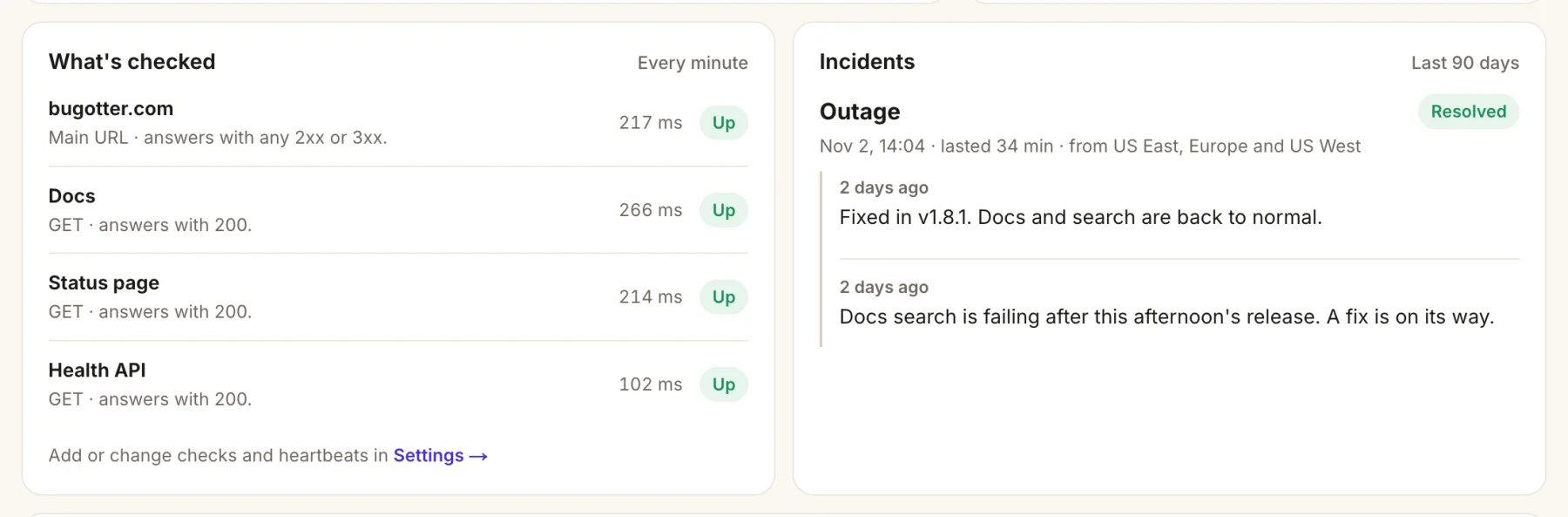
- Every minute, for the main URL and each extra check.
- What counts as up: the main URL answers with any 2xx or 3xx.
- A health route that must answer 200, so the check fails when the data layer does.
- Confirmed from three regions: US East, Europe and US West, with how long it lasted.
3. Who gets told, and when
An alert you don’t trust is worse than none. Three rules keep them worth reading:
- Alert on confirmed problems only. Down after two regions agree, back up when it’s back, certificates and domains before they expire.
- One alert per incident. When a deploy breaks things, you get “down”, “errors spiking” and “slow” within minutes. BugOtter folds problems on the same app within 15 minutes into one alert, titled with everything in it (“shop.app: down after deploy v1.4.2 · errors spiking”), and lists what was held in the “back up” message.
- Send it where you look. Telegram, Discord, Slack, email, or push to your phone or browser. Each channel can have a minimum severity, quiet hours (critical alerts still get through) and muted apps.
Before a risky deploy, schedule a maintenance window. Checks keep running but alerts for that app stay quiet, and the status page says maintenance is in progress instead of showing an outage.
Link outages to deploys
Import your Vercel projects into BugOtter and every production deploy is recorded. When an outage starts within 10 minutes of a deploy, the incident says “Likely caused by deploy …”, which is usually all you need to decide to roll back in Vercel first and debug second.
4. The status page
A status page does two jobs:
- During an outage it answers “is it just me?” so people stop emailing you.
- The rest of the time it shows a record of uptime, which quietly builds trust with people deciding whether to pay.
Each BugOtter app has a public status page you can turn on, at https://bugotter.com/status/your-app. It shows:
- The current state in one line (“All systems operational”, “Some features aren’t working”, “Scheduled maintenance in progress”).
- Uptime for the last 90 days, and recent incidents with how long they lasted.
- Parts, if you set them: Website, Checkout and API, each with its own state, so a broken checkout doesn’t make the whole app look down.
- The updates you post during an incident, and a form so people can subscribe by email.
It never shows revenue, logs or errors. During an outage, post a short update in plain words: what’s affected, what you’re doing, when you’ll update next.
Your coding agent can post one too, with your permission, through the post_status_update tool.
Link it from your app’s footer and help page. A status page nobody can find doesn’t stop the emails.

- The current state in one line, updated as checks run.
- Each part with its own uptime: Website 99.99%, Docs and API 100%.
- Recent incidents with how long they lasted: a partial outage on Docs, down for 34 min.
- Your updates, in plain words, newest first.
5. Your own status domain
A status page on status.yourapp.com looks like part of your product. It keeps working when your app doesn’t, because it’s served by BugOtter, not by your Vercel project.
In BugOtter this is part of Pro (and the trial).
Enter the domain
On the app’s status page settings, under “Your own domain”, enter something like
status.yourapp.com. BugOtter shows the exact records to add.Point it at BugOtter
For a subdomain, a CNAME. The value comes from Vercel’s recommendation, so copy the one the app shows; it’s usually this:
Type Name Value CNAME statuscname.vercel-dns.comAn apex domain (like
yourstatus.com) gets an A record instead, with the IP the app shows.Prove it’s yours
Add a TXT record with the token from the app. Nothing is served on the domain until this is found, so nobody else can claim it:
Type Name Value TXT _bugotter.statusbugotter-verify=<your token>Wait for the certificate
The card walks through DNS, verify, securing and live. It usually takes minutes, sometimes an hour. It’s live once HTTPS answers with a valid certificate.
One Vercel-specific catch: BugOtter attaches your status domain to its own Vercel project. If status.yourapp.com is already added to one of your Vercel projects, Vercel refuses it elsewhere. Remove it from your project first.
If your DNS is managed by Vercel, add the records under the domain in Vercel’s Domains settings, like any other DNS provider.
6. A README badge
With the status page on, an uptime badge for your README or docs links people straight to it. It’s a small thing that answers “is this maintained?” for open-source projects and developer tools.
[](https://bugotter.com/status/your-app)Want to try a status page before setting up checks? The free status page tool shows what one looks like for your URL.
Questions
Isn’t Vercel’s status page enough?
It tells you whether Vercel’s platform is healthy. Your app can be down while Vercel is green: a bad deploy, a database that’s out of connections, an expired API key, a function that times out. You need checks against your own URLs for that.
Can I check a protected preview deployment?
Check your production domain instead. Previews and generated deployment URLs are usually behind Vercel’s Deployment Protection and answer a login page or an error to an outside checker, which looks like an outage.
Do status page visitors see my errors or revenue?
No. A BugOtter status page shows uptime, incidents and the updates you post, never revenue, logs or errors.
Which plan has status pages on my own domain?
Pro. A status page on bugotter.com comes with every plan, and the 14-day trial includes the own-domain option.
How do I avoid alerts during a planned deploy?
Schedule a maintenance window before a risky deploy. Checks still run, but no alerts go out for that app while it’s open, and the status page says maintenance is in progress.
Know your app is down before your users tell you.
14 days of everything, no card needed. Plans from $10 a month, billed yearly.