
Sentry alternative
A Sentry alternative for indie hackers
BugOtter takes errors from the Sentry SDK you already use: change the DSN, keep your code. Next to the errors it shows uptime, traffic and revenue for every app, so you see who an error hurt and whether it cost you sales. It doesn't do performance tracing, profiling or session replay. If you need those, stay on Sentry.
- 1 lineto change: the DSN
- 50kerrors a month on Builder, all apps together
- 4 jobserrors, uptime, traffic and revenue

The short version
Keep your Sentry SDK
Point the DSN at BugOtter. Errors and messages arrive; tracing and replay data is accepted and dropped.See what each error costs
Errors sit next to uptime, traffic and revenue, so the one hurting paying customers comes first.Stay on Sentry for depth
Tracing, profiling, replay, mobile crashes and teams. When to stay.
At a glance
| Feature | Sentry | BugOtter |
|---|---|---|
| Errors | ||
| Error tracking and grouping | Yes | Yes |
| Works with the Sentry SDKs | Yes | PartlyErrors and messages |
| Source maps | Yessentry-cli, bundler plugins | Yesnpx bugotter sourcemaps |
| Release health | YesCrash-free sessions and users | YesError rate per release, new and returning errors |
| Deploy markers | Yes | YesVercel, webhook or CLI |
| Beyond errors | ||
| Performance tracing | Yes | No |
| Session replay | YesWeb and mobile | No |
| Profiling | YesPay as you go | No |
| Logs | Yes | No |
| Cron monitoring | Yes1 monitor included | YesHeartbeats |
| Uptime checks | Yes1 included, more pay as you go | YesEvery app, 3 regions |
| Web analytics and revenue | No | Yes |
| Who an error hurt, in money | No | YesPaying customers who hit it (browser script) |
| Working with it | ||
| AI debugging | Seer, paid per contributor | MCP for your own agent |
| MCP server | Yes | Yes |
| Users | One on Developer, unlimited on Team | One login per account |
| Self-hosting | YesFSL licence | No |

Checked Nov 4, 2026 on their own pages: sentry.io/pricing, Sentry product docs, Sentry docs: Session Replay, Sentry docs: release health, Sentry docs: Apple debug symbols, Sentry docs: Seer pricing, Sentry MCP server, Self-hosted Sentry. Prices are in USD as their pages showed them, and they can change. We re-check every quarter.
What Sentry does well
Sentry is the standard for error tracking, and it earned that. Its SDKs cover nearly every language and framework, and they're open source, which is why tools like BugOtter can accept them at all.
- Depth beyond errors. Tracing across services, session replay for web and mobile, profiling, logs, cron and uptime monitors, user feedback. One SDK, one place.
- Mobile and native. Session replay for Android, iOS, React Native and Flutter, and symbolication for native crashes.
- A generous free plan. Developer is free for one user with 5k errors and 50 replays a month.
- Seer. An AI agent that looks at an issue and suggests a fix, priced per active contributor.
- Self-hosting. You can run Sentry yourself under the FSL licence, if you have a server with 16 GB of RAM to spare.
Where BugOtter is different
Errors next to the rest of the app
An error page in Sentry tells you what broke. In BugOtter the same page also knows the app's traffic, uptime, deploys and revenue.
For errors caught by the BugOtter script, it shows how many visits hit it, how many of those were paying customers, and who reached checkout and didn't buy. So “which error first?” has a plain answer: the one that costs money.
Errors that come in through a Sentry SDK can't be linked to visits, so they show the counts and the stack, not the money.
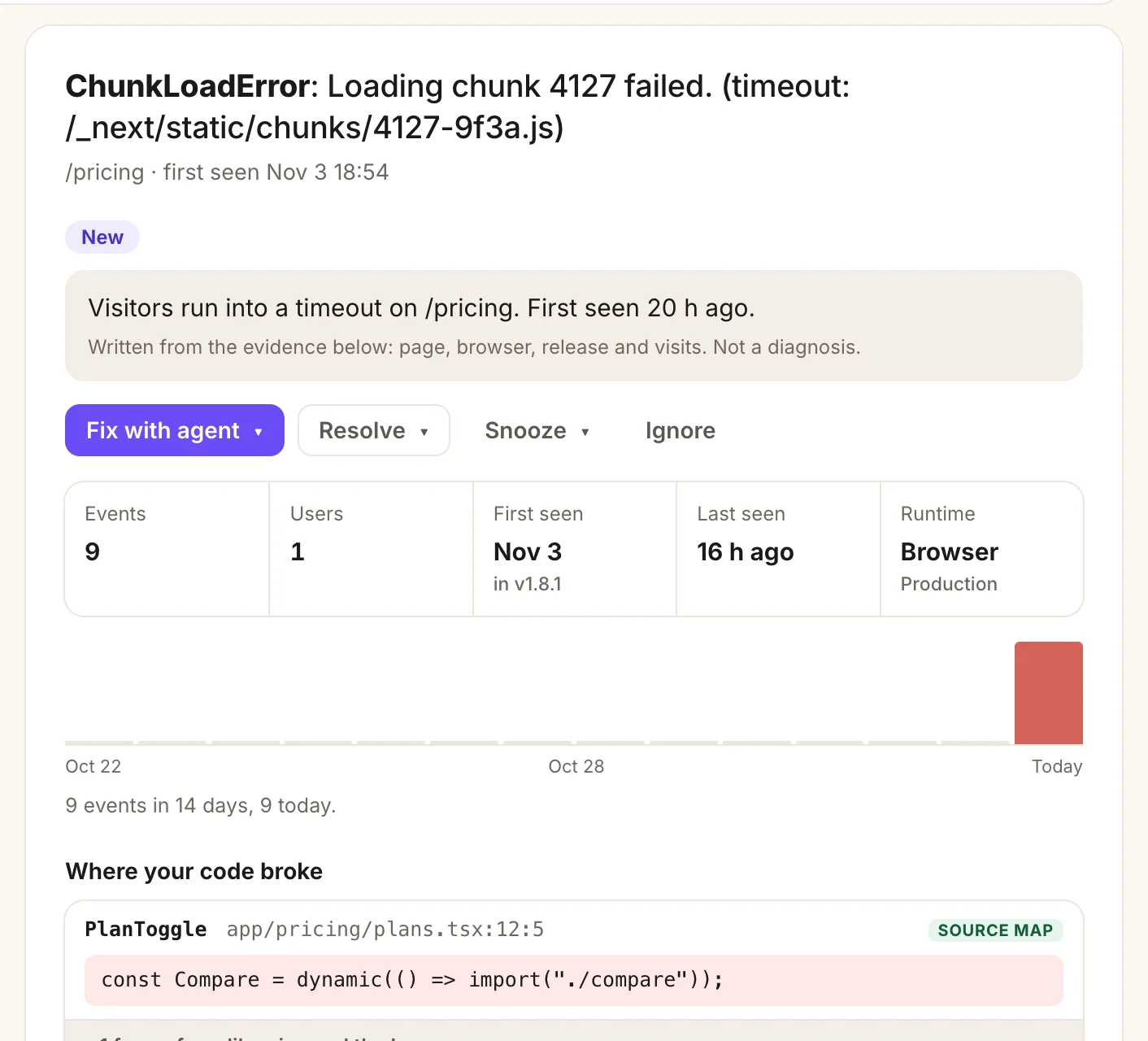
- A plain summary, written from the evidence: page, browser, release and visits. Not a diagnosis.
- Fix with agent hands the error, with its stack and breadcrumbs, to your coding agent.
- The release it started in, so you know which deploy to look at.
- Your own line of code, from the source map you uploaded.
Fewer things to configure
Errors are grouped by type and the top lines of your own code, not by the exact message, so one bug with a changing id in its message stays one issue.
- Browser noise is dropped before it becomes an issue: extensions, bots, ad scripts, harmless warnings.
- A resolved issue reopens by itself if it comes back.
- Emails, keys and tokens are scrubbed before anything is stored, and user ids are kept only as salted hashes.
Release health, the indie way
Sentry's release health is built on sessions: crash-free users and sessions per release. BugOtter compares each release (or deploy) with the one before: errors per hour, error types first seen since it, and resolved errors that came back.
A deploy check adds response time and paid conversion. It answers “did my last deploy make things worse?” without session data.
Your agent fixes it
Connect the BugOtter MCP server and Claude Code, Cursor or Codex can read the error with source-mapped lines and breadcrumbs, open a fix, and then ask BugOtter whether the error rate actually dropped after the deploy. There's no per-seat AI charge: your agent, your model.
Exactly what works with a Sentry SDK
BugOtter implements the part of Sentry's ingest format that carries errors. Here's precisely what that means:
- Endpoints:
/api/<project>/envelope/and the older/api/<project>/store/, the paths every Sentry SDK builds from the DSN. Gzip and deflate bodies are fine, up to 1 MB per request. - Auth: the public key from the DSN, read from the
X-Sentry-Authheader, thesentry_keyquery parameter or the envelope'sdsnheader. - Kept: exception type and message, stack frames (up to 60), level (fatal, error, warning), release, environment, the page path or transaction name, browser, OS and runtime, a custom
fingerprintif you set one, andcaptureMessagemessages. - Kept, with care: breadcrumbs for navigation and fetch/XHR requests, as paths and status codes only. User ids and IPs become salted hashes, used only to count affected users.
- Dropped on purpose: console and click breadcrumbs, tags, extra data and other contexts. They tend to carry personal data.
- Accepted and ignored: transactions and spans, sessions, replays, profiles, check-ins, user feedback, attachments and logs.
- Limits: up to 1,000 events per app per hour, so one runaway loop can't flood your account. Errors count toward your plan's monthly pool (5k on Starter, 50k on Builder, 250k on Pro).
Sentry documents the format at Sentry docs: the DSN and Sentry developer docs: envelopes.
Pricing side by side
Every plan of both, at monthly prices. Sentry's plans cover errors and more of Sentry; BugOtter's cover errors plus uptime, analytics and revenue.
| Option | Part | Cost | Why |
|---|---|---|---|
| Sentry DeveloperOne user, 5k errors | One user, 5k errors | $0 | One user, 5k errors, 50 replays, 30-day lookback |
| Sentry DeveloperOne user, 5k errors | Total | Free | |
| Sentry Team$26/mo yearly | 50k errors, unlimited users | $29 | 50k errors, 50 replays, 5M spans, up to 90-day lookback |
| Sentry Team$26/mo yearly | Total | $29/mo | |
| Sentry Business$80/mo yearly | 50k errors, added retention | $89 | 50k errors, up to 90-day lookback and additional sampled retention |
| Sentry Business$80/mo yearly | Total | $89/mo | |
| BugOtter Starter$10/mo yearly | 5k errors, 3 apps | $12 | 5k errors a month, all apps together. 3 apps with uptime, analytics, revenue and status pages |
| BugOtter Starter$10/mo yearly | Total | $12/mo | |
| BugOtter Builder$24/mo yearly | 50k errors, 10 apps | $29 | 50k errors a month, all apps together. 10 apps with uptime, analytics, revenue and status pages |
| BugOtter Builder$24/mo yearly | Total | $29/mo | |
| BugOtter Pro$49/mo yearly | 250k errors, 30 apps | $59 | 250k errors a month, all apps together. 30 apps with uptime, analytics, revenue and status pages |
| BugOtter Pro$49/mo yearly | Total | $59/mo |
Sentry Team is $29 a month for errors with unlimited users. BugOtter Builder is $29 for errors plus uptime, analytics and revenue on 10 apps.
Free
Sentry Developer wins for errors alone
For one user with 5k errors, 50 replays and a 30-day lookback, Sentry's free plan is cheaper than anything we sell. BugOtter is the better deal when you'd otherwise pay for uptime, analytics and revenue tracking on top.
Sentry's yearly prices are “when billed annually with default pre-paid data”. Checked Nov 4, 2026 on their own pages: sentry.io/pricing. Prices are in USD as their pages showed them, and they can change. We re-check every quarter.
Switching: change one DSN
Add the app and copy its DSN
Each app in BugOtter has a DSN on its page.
npx bugotter initwrites it to.env.localasBUGOTTER_DSN. It looks likehttps://<key>@bugotter.com/<project>.Point your SDK at it
Keep the SDK and the code you have. Only the DSN changes, and tracing and replay can go:
sentry.server.config.ts (or wherever you call init) import * as Sentry from "@sentry/nextjs"; // or @sentry/node, sentry-sdk (Python), … Sentry.init({ dsn: process.env.BUGOTTER_DSN, release: process.env.VERCEL_GIT_COMMIT_SHA, // any id, as long as source maps use the same tracesSampleRate: 0, // SDK v11+. On v10 or older use sendDefaultPii: false instead. dataCollection: { userInfo: false, cookies: false, httpBodies: [] }, });Upload source maps with the BugOtter CLI
sentry-cli and Sentry's bundler plugins upload to Sentry. For BugOtter, run this after each build (Next.js needs
productionBrowserSourceMaps: true):After the build npx bugotter sourcemaps .next --release $VERCEL_GIT_COMMIT_SHA --deleteUse the same release as in
Sentry.init.--deleteremoves the maps afterwards so your source isn't public.Add the script for browser errors
For the browser, the BugOtter script catches uncaught errors and failed promises on its own, and links them to the visit, which is what lets BugOtter show who they hurt. You can drop the browser Sentry SDK, or keep it.
Tell BugOtter about deploys
Connect Vercel, add the webhook, or run
npx bugotter deploy. Then every new issue says which deploy it started after.
Should you switch?
Questions
Can I use the Sentry SDK with BugOtter?
Yes. BugOtter accepts the open format Sentry SDKs send, at the same endpoints (envelope and the older store endpoint). Change the DSN in Sentry.init to your app's BugOtter DSN and errors arrive in BugOtter. BugOtter isn't affiliated with Sentry.
Which Sentry features don't work with BugOtter?
Only error and message events are kept. Performance tracing (transactions and spans), session replay, profiling, sessions, cron check-ins, user feedback, attachments and logs are accepted and dropped, so your SDK doesn't error, but nothing shows up. Source maps go through the BugOtter CLI, not sentry-cli.
Should I turn tracing and replay off in the SDK?
Yes, if BugOtter is the only destination. Set tracesSampleRate to 0 and leave the replay integration out. It saves bandwidth in your users' browsers, since BugOtter would drop that data anyway.
Does BugOtter work for mobile apps?
BugOtter's errors and source maps are built for JavaScript apps in the browser and on the server, and for server SDKs like Python. A mobile Sentry SDK can send events, but native crash symbolication (iOS dSYMs, Android mapping files) isn't supported. For mobile apps, Sentry is the better choice.
Is there a free plan like Sentry's Developer plan?
No. BugOtter has a 14-day trial with everything, then plans from $10 a month billed yearly. Sentry's Developer plan is free for one user with 5k errors. If you only need errors for one app, that's hard to beat.
Can I send errors to both Sentry and BugOtter?
Yes. Keep your Sentry DSN for the server SDK and add the BugOtter script for browser errors, or run two SDK clients. Many people try BugOtter that way before changing anything.
Keep your SDK. See what each error costs.
14 days of everything, no card needed. Plans from $10 a month, billed yearly.