
Guide · Many apps, one person
How to watch 10 side projects without 10 tools
Watch many side projects by putting them all in one list that only shows what needs you, sorting them into three tiers, putting the quiet ones to sleep, and spending 20 minutes on Monday instead of a little every day. Everything else is noise.

Why 10 dashboards fail
One list of what needs you
Empty when things are fine. Each line says which app, what’s wrong and what to do next.Three tiers, quiet apps asleep
Earning, Growing, Parked. Every app gets uptime, SSL and domain checks; parked ones cost zero attention.Alerts for now, 20 minutes for the rest
Alert only on what you’d act on today. Everything else waits for a short Monday review.
If you ship a lot, you know how this goes. App one has Google Analytics because it was the first. App four has Plausible. Three have Sentry, one on a free plan that ran out in March.
Uptime is a free tier somewhere, watching five of the twelve. Revenue is in two Stripe accounts and a Lemon Squeezy store. Each tool is fine. Together they fail in three ways:
- You have to go look. Ten tools times twelve apps is a lot of tabs. So you check the apps you’re excited about and the rest go unwatched. That’s where the domain quietly expires.
- Nothing connects. The error tracker doesn’t know you deployed, the analytics doesn’t know who paid, the uptime tool doesn’t know the outage cost you three checkouts. You become the integration layer.
- Alerts multiply. Every tool emails for its own reasons. After a few weeks you filter them all, and then you miss the one that mattered.
The fix isn’t a better dashboard. It’s fewer places to look and a habit for looking. Here’s the system, in five rules. You can follow it with any tools; the notes show where BugOtter does a step for you.
Rule 1: one list of what needs you
A dashboard shows everything. You want the opposite: a list that’s empty when things are fine.
Each line should say which app, what’s wrong, how long it’s been that way and what to do next. If an app is healthy, it gets one quiet line at the bottom, or nothing.
What belongs on that list, in order:
- Down, confirmed from more than one place.
- Errors that are new, came back, or are hurting paying customers.
- Payments failing, renewals at risk.
- Slow, a cron job that didn’t run, a certificate or domain about to expire.
- A deploy that made errors, speed or conversion worse.
What doesn’t belong: traffic graphs, vanity numbers, anything you can’t act on today. Those are for the weekly review.
This is what BugOtter’s Home is: “Needs you” with each problem, why it’s there and one action (check now, open, snooze, or hand it to your coding agent), then every other app on one line with a small trend.
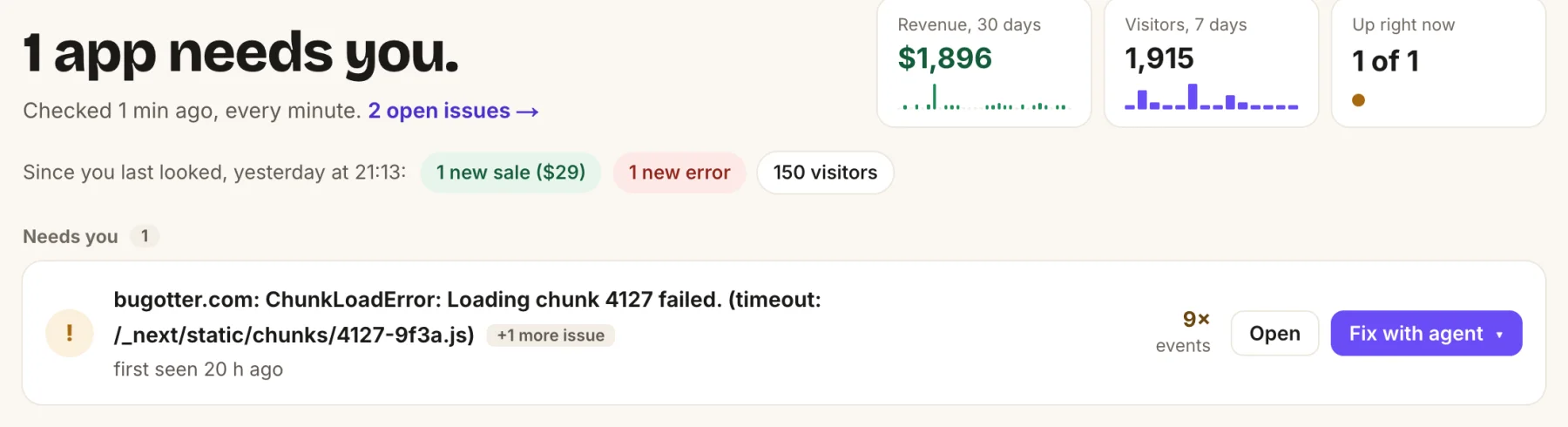
- The headline is the answer: how many apps need you right now.
- What changed since you last looked: sales, new errors, visitors.
- One row per problem, with one action. Open it, or hand it to your agent.
Rule 2: three tiers, not ten projects
Treating every project the same is why ten projects feel like ten jobs. Sort them, honestly, into three tiers, and give each tier a different level of watching.
| Tier | What it is | Watch |
|---|---|---|
| Earning | Makes money or has real users who’d notice. | Uptime every minute, extra checks on checkout and sign-in, the script for traffic and errors, revenue connected, source maps, deploys linked. Alerts on everything that matters. |
| Growing | You’re actively working on it this month. | Uptime, the script for traffic and errors, revenue once you sell. Alerts for down and new errors. |
| Parked | Shipped, live, not getting attention. | Uptime, SSL and domain expiry only. Asleep. |
Be strict. Most people have one or two Earning apps, two or three Growing, and the rest Parked, however they feel about it. That’s fine. A Parked app should cost you zero attention until it breaks.
Every app, whatever the tier, gets uptime, SSL and domain checks.
These failures are silent (nobody emails you that your certificate expired; they just leave), cheap to watch, and expensive to discover late.
A lapsed domain on a Parked app can be bought by someone else and pointed at spam, with your old backlinks.
Rule 3: put quiet apps to sleep
Most monitoring is priced per app or per site, so parked projects quietly cost money every month, and the bill nudges you to stop watching them. That’s backwards: parked apps are exactly the ones nobody else is watching.
BugOtter handles this with sleep. A sleeping app is still checked on its usual schedule, still alerts when it goes down and still gets SSL and domain warnings.
Free
A sleeping app doesn’t count toward your plan.
Plans count awake apps (3 on Starter, 10 on Builder, 30 on Pro); sleeping ones are unlimited.
Two honest details:
- Sleep is something you choose, not automatic. You put an app to sleep from its page, from the weekly email, or by asking your agent.
- While an app sleeps, traffic and errors aren’t recorded. When you start working on it again, wake it, and everything is recorded again.
The weekly email helps you keep this tidy: it lists apps with no visitors, sales or errors in 30 days and puts a one-click “Put to sleep” link next to each.
Rule 4: alerts you won’t mute
Alert fatigue is the real killer for portfolio founders. The moment you start ignoring alerts, you might as well not have them. Keep them trustworthy with these rules:
- Alert only on things you’d act on now. Down, payments failing, a new error type, a certificate about to expire. Not “traffic dropped 20%”; that’s for Monday.
- Confirm before you alert. One failed check from one place is usually the checker’s network. BugOtter calls an app down only when two of three regions agree after a retry.
- One incident, one alert. A bad deploy causes down, errors and slow responses within minutes. BugOtter folds problems on one app within 15 minutes into one alert, and damps alerts that flap.
- Errors: new, not every. Alert on a new error type or one that came back, not on every event of a known one. Snooze a known error until it gets worse, or for 1,000 more events, instead of muting the app.
- Quiet hours with an exception. No warnings at 3 a.m.; critical ones still get through. Per channel, so your phone can be stricter than your email.
- Route by tier. Earning apps to the channel that wakes you (Telegram, push). Parked apps to email. Mute an app per channel instead of muting the channel.
Under half?
Count last month’s alerts and how many you acted on.
If it’s under half, change the rules, not your attention.
Rule 5: a 20-minute Monday
Checking a little every day feels responsible and spreads your attention thin. Replace it with alerts for the urgent and one short review a week.
BugOtter’s weekly email arrives Monday at 8:00 in your time zone with what needs you, what changed per app, new and returning errors, good news (first sales, new highs) and quiet apps you could put to sleep. Use it as the agenda.
Clear the list (5 min)
Open the Needs you list. For each item: fix it, hand it to your coding agent, or snooze it with a reason. Don’t leave anything sitting there without a decision; an ignored item trains you to ignore the list.Money and movement (5 min)
Revenue across apps: new, upgrades, downgrades, cancellations. Which apps grew, which went quiet. Glance at the all-sites table for traffic changes worth a question.What launches did (5 min)
For anything you posted last week, look at revenue by source, not visitors. Note it on the traffic chart so next month’s you knows why there was a spike. The revenue by source guide shows how.Re-tier (5 min)
Anything that moved? An app that got its first sale moves up. One you haven’t touched in a month moves down and goes to sleep. Pick the one app that gets your build time this week.
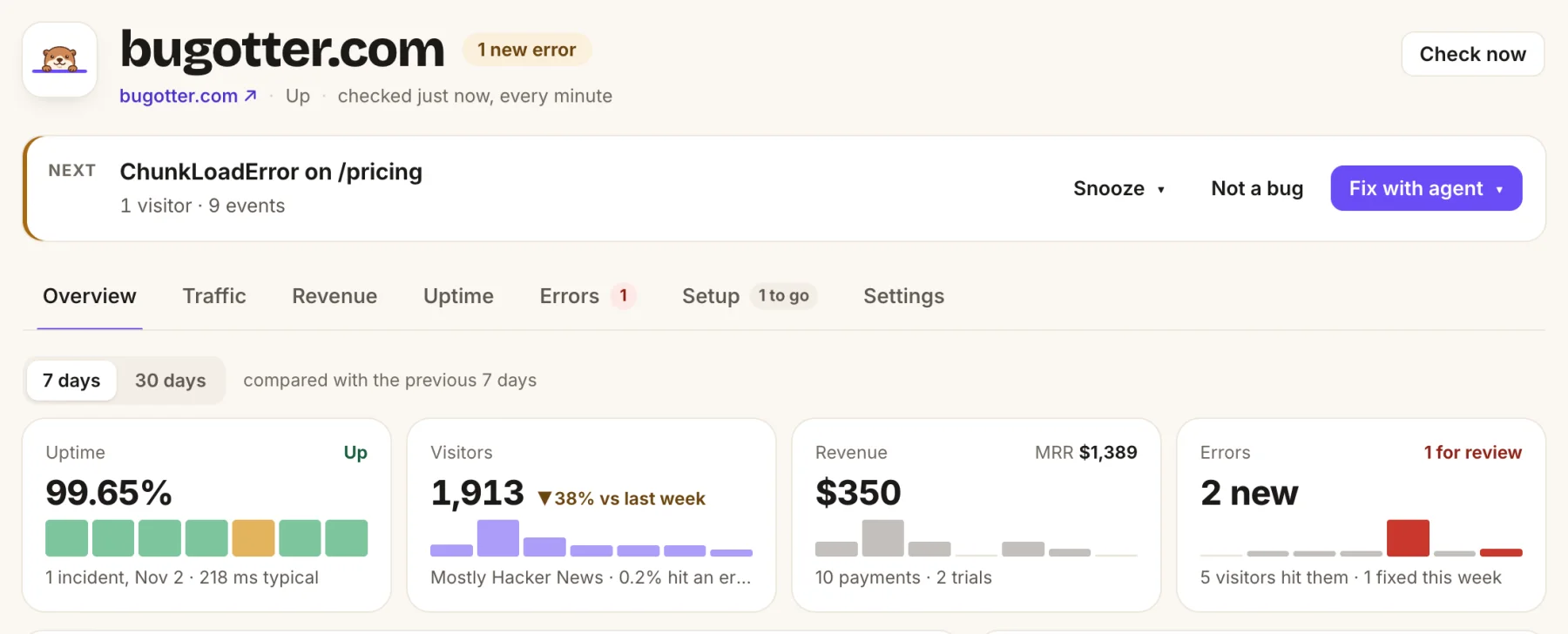
- The one thing to do next, with Snooze, Not a bug or Fix with agent.
- 7 or 30 days, compared with the period before.
- Uptime, visitors, revenue and errors for the week, side by side.
If you use a coding agent, it can run the first step for you. Connected over MCP, ask for the morning_briefing prompt: what needs you first and why, what can wait, and a suggested next step for each.
When to shut one down
Watching is cheap. Hosting, domains, API bills and your guilt aren’t. Once a quarter, look at each app’s last 30 days: revenue, running costs, profit and visitors with trend.
The “Which apps are worth keeping” panel on BugOtter’s Revenue page (and get_portfolio for your agent) does this and suggests keep, watch, put to sleep or too new. They’re suggestions; you decide.
A good rule of thumb: an app that’s been asleep for six months, makes nothing, and costs more than its domain is a candidate to shut down properly.
- Export anything you need.
- Redirect the domain to something you still run.
- Keep the domain if it has backlinks.
Shutting down on purpose beats letting it rot with a broken checkout.
Plan counts come from BugOtter’s current plans. Sleeping apps are free on every plan.
Questions
How many side projects can one person actually watch?
Watching is cheap if it’s one list and alerts only for real problems. Maintaining is what’s expensive. Most solo founders can watch 20 or more apps this way; they can only actively grow two or three at a time. The tiers exist to make that explicit.
Do sleeping apps still get uptime checks?
Yes. In BugOtter a sleeping app is still checked on its usual schedule and still alerts when it goes down, but it doesn’t count toward your plan. While it sleeps, traffic and errors aren’t recorded; wake it when you start working on it again.
Should every app have analytics and error tracking?
No. Every app should have uptime, SSL and domain checks, because those failures are silent and cheap to catch. Add the script for traffic and errors when an app matters to you, and connect revenue when it makes money.
What about a daily digest?
BugOtter sends one weekly email, Monday at 8:00 in your time zone. Real problems come as alerts the moment they happen, so a daily summary would mostly repeat them. If you want a daily look, ask your coding agent for the morning briefing.
All your apps in one calm list.
14 days of everything, no card needed. Plans from $10 a month, billed yearly.