
Astro integration
Astro analytics, error tracking and uptime
BugOtter works with static and server-rendered Astro sites. Add one is:inline script to your layout for cookieless analytics and browser errors. Add @sentry/astro if you render on a server. Uptime and a status page start when you add the URL.
- 1 tagis:inline, in your layout
- Static or SSRboth work
- 3 regionsuptime checks
What BugOtter gives an Astro site
Analytics with no banner
One script in your base layout. View Transitions count, and nothing runs twice.Browser errors, free
A static site needs no SDK at all. Server-rendered pages add@sentry/astro.Uptime for the pages that earn
Home, pricing and docs checked from three regions, with a status page.
Script in your layout
Withis:inline. DetailsProxy at your host
Optional, gets past ad blockers. DetailsServer errors, if you render
Pointed at your BugOtter DSN. DetailsTerminal:npm install @sentry/astroUpload source maps
From the folder your host serves. DetailsAfter astro build:npx bugotter sourcemaps dist --deleteUptime and deploys
Extra checks, deploy markers, a status page. Details
Analytics: one script in your layout
Add your site in BugOtter
Paste the URL, or import every project from Netlify, Cloudflare or Vercel. Uptime checks start right away. Your app id is on the site's page.
Put the script in the layout every page uses
Most Astro sites have one base layout. Put the tag in its
<head>, withis:inlineso Astro leaves it alone. Every page that uses the layout is counted, with no cookies and no banner.src/layouts/Layout.astro --- // src/layouts/Layout.astro const { title } = Astro.props; --- <html lang="en"> <head> <meta charset="utf-8" /> <title>{title}</title> <script is:inline defer src="https://bugotter.com/bo.js" data-app="YOUR_APP_ID"></script> </head> <body> <slot /> </body> </html>View Transitions just work
Without a client router, every Astro page is a full page load and counts on its own. With
<ClientRouter />, Astro useshistory.pushState, which the script follows, and it doesn't run the same head script twice. Each new path is one page view, with its own time on page and scroll depth.Goals without a framework
A content site's goals are usually a newsletter form, a download or an outbound link. Forms, file downloads and outbound clicks are counted with no code. Name a form with
data-bo-name. For anything else, callwindow.bo?.track()from a small script:src/components/Newsletter.astro <!-- src/components/Newsletter.astro --> <form id="newsletter" data-bo-name="newsletter" action="/api/subscribe" method="post"> <input type="email" name="email" required /> <button>Subscribe</button> </form> <a href="https://github.com/you/project" data-goal="star">Star on GitHub</a> <script> // Astro bundles this script; it runs once per page load. document.querySelectorAll<HTMLElement>("[data-goal]").forEach((el) => el.addEventListener("click", () => window.bo?.track(el.dataset.goal!)), ); </script>Using TypeScript? Declare
window.boonce:src/bo.d.ts declare global { interface Window { bo?: { track(name: string, props?: Record<string, string | number | boolean>): void; visitorId(): string | null; }; } } export {};
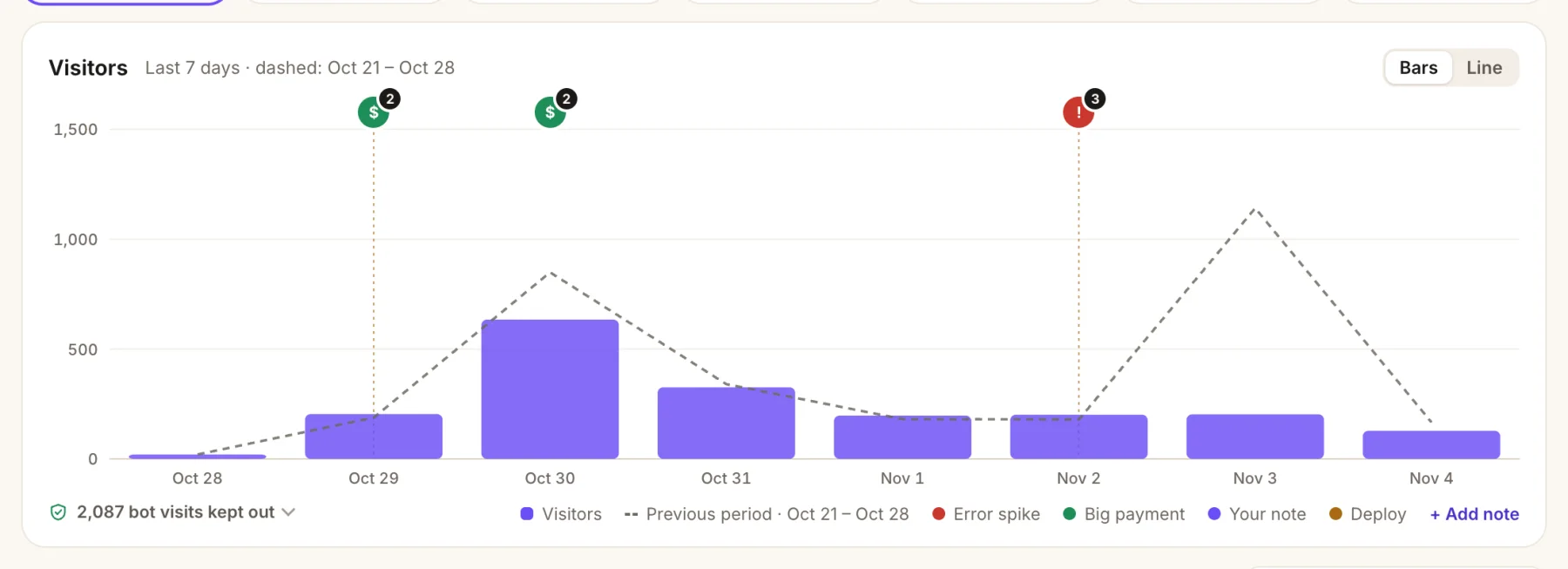
- Payments on the chart. A green marker shows the day a big payment came in.
- Error spikes, too. A red marker lines up a bad day with the error behind it.
- Last period, dashed, so a drop or a launch spike is obvious at a glance.
- Bots kept out of every number, with the count one click away.
Get past ad blockers: proxy at your host
20–40%
of visitors are dropped by ad blockers for most analytics
Astro can't do this on its own: it has no rewrite to an outside URL, and it ignores pages and folders that start with _. Your host can, for static and server sites alike:
- Netlify: three lines in
netlify.tomlorpublic/_redirects. See Netlify. - Vercel: three rewrites in
vercel.json. See Vercel. - Cloudflare Pages:
_redirectscan't proxy to another domain, so use a small Pages Function. See Cloudflare.
Then change the tag to src="/_bo/bo.js". Put any _redirects file in public/: Astro copies that folder into the build as it is.
Errors: browser errors free, server errors with @sentry/astro
The script already catches uncaught browser errors and failed promises, with the pages and failed requests before them. For a static site, that's all there is.
If you render on a server (output: "server", or pages with prerender = false), add Sentry's Astro SDK and point it at your BugOtter DSN. No Sentry account needed.
Install the SDK
terminal npm install @sentry/astroAdd the integration, server side only
enabled.client: falsekeeps the Sentry browser SDK out of your pages, since the script covers the browser.sourcemaps.disablestops it trying to upload to Sentry.astro.config.mjs // astro.config.mjs import { defineConfig } from "astro/config"; import node from "@astrojs/node"; import sentry from "@sentry/astro"; export default defineConfig({ output: "server", adapter: node({ mode: "standalone" }), integrations: [ sentry({ enabled: { client: false, server: true }, // the script already catches browser errors sourcemaps: { disable: true }, // maps go to BugOtter, not Sentry telemetry: false, }), ], vite: { build: { sourcemap: "hidden" } }, });Init it with your DSN
sentry.server.config.ts // sentry.server.config.ts (project root) import * as Sentry from "@sentry/astro"; Sentry.init({ dsn: process.env.BUGOTTER_DSN, // release: process.env.VERCEL_GIT_COMMIT_SHA, // on Vercel: ties errors to deploys dataCollection: { userInfo: false, cookies: false, httpBodies: [], databaseQueryData: false }, });The
dataCollectionline is for SDK v11; on v10 usesendDefaultPii: false. Leave outtracesSampleRate: BugOtter keeps errors, not traces.
Kept
- Exceptions and
captureMessageevents, grouped into issues - Release, environment, the request path and runtime
- Navigation and failed-request breadcrumbs
- Your user id, hashed (never stored raw)
Accepted, then dropped
- Performance traces and spans
- Session replays and profiles
- Sessions, logs and metrics
- Console breadcrumbs and click text
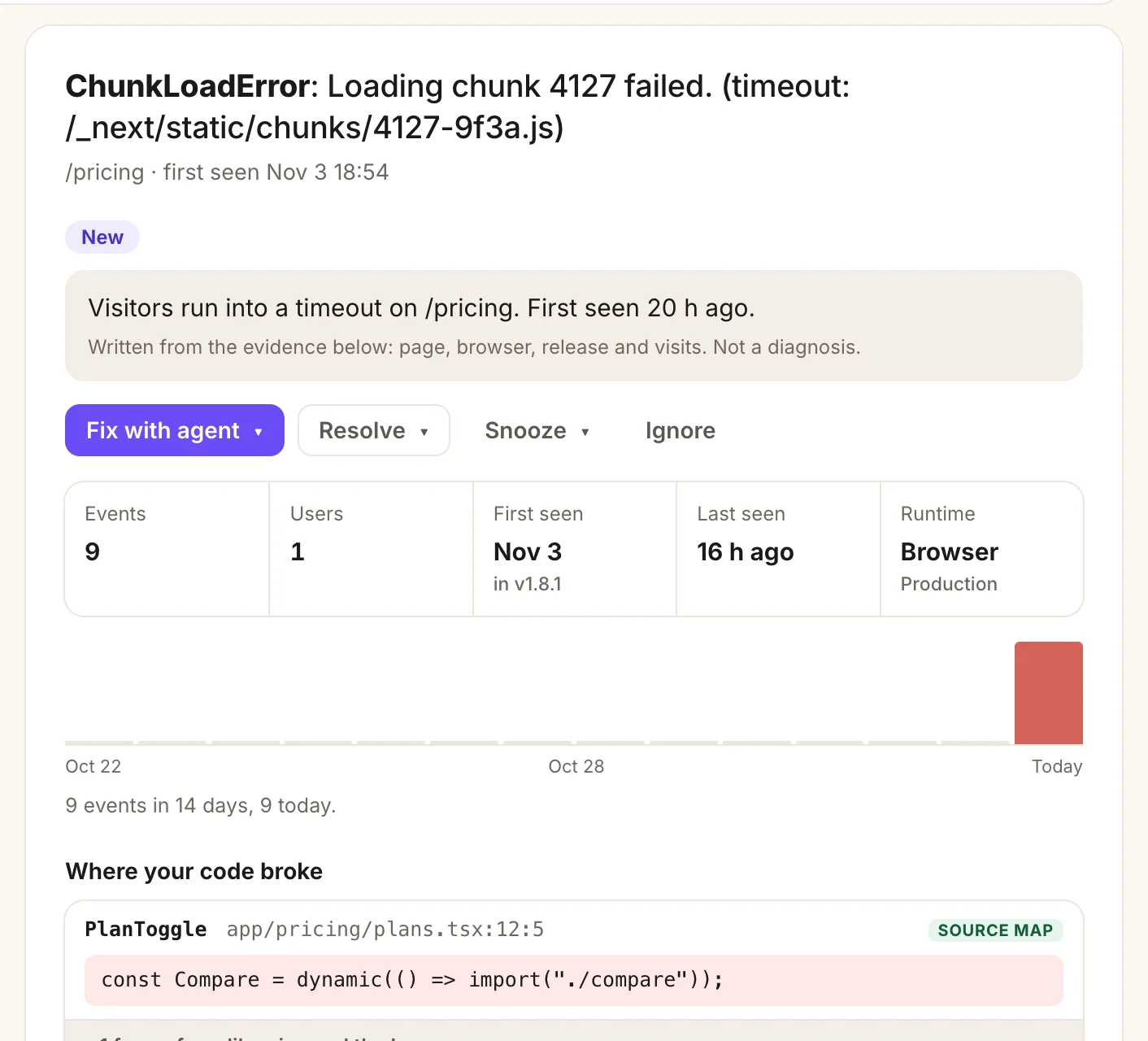
- A plain summary written from the evidence: page, browser, release and visits.
- Fix with agent hands the whole issue to Claude Code, Cursor or Codex.
- Where your code broke, mapped back to your file and line with your source maps.
Readable stacks from your Astro build
Set vite.build.sourcemap to "hidden" (as in the config above): Vite writes the maps but no link to them in your scripts. Then upload them after astro build, from the folder your host serves:
| Setup | Upload from |
|---|---|
| Static, or Netlify and Cloudflare adapters | dist |
@astrojs/node | dist/client |
@astrojs/vercel | .vercel/output/static |
"build": "astro build && npx bugotter sourcemaps dist --delete"--delete removes the maps before deploy. The CLI reads BUGOTTER_PROJECT and BUGOTTER_KEY from your build environment.
It tags the upload with the commit (Netlify, Cloudflare Pages and Vercel commit variables are read on their own). The source maps guide has the details.
Uptime, a status page and deploys
3 regions
check every page you add, with SSL and domain expiry watched
For a content site, check the pages that earn: the home page, the pricing or signup page, and the docs. Add the extra paths as checks on the site, with an expected word on the page so a blank build doesn't pass.
Deploys: automatic once Vercel is connected. On Netlify, add the deploy webhook from your site's page in BugOtter as an outgoing Deploy succeeded notification. Anywhere else, run npx bugotter deploy as the last step.
Status page: one switch, at bugotter.com/status/your-site, with an uptime badge for your README. Pro can use your own domain.
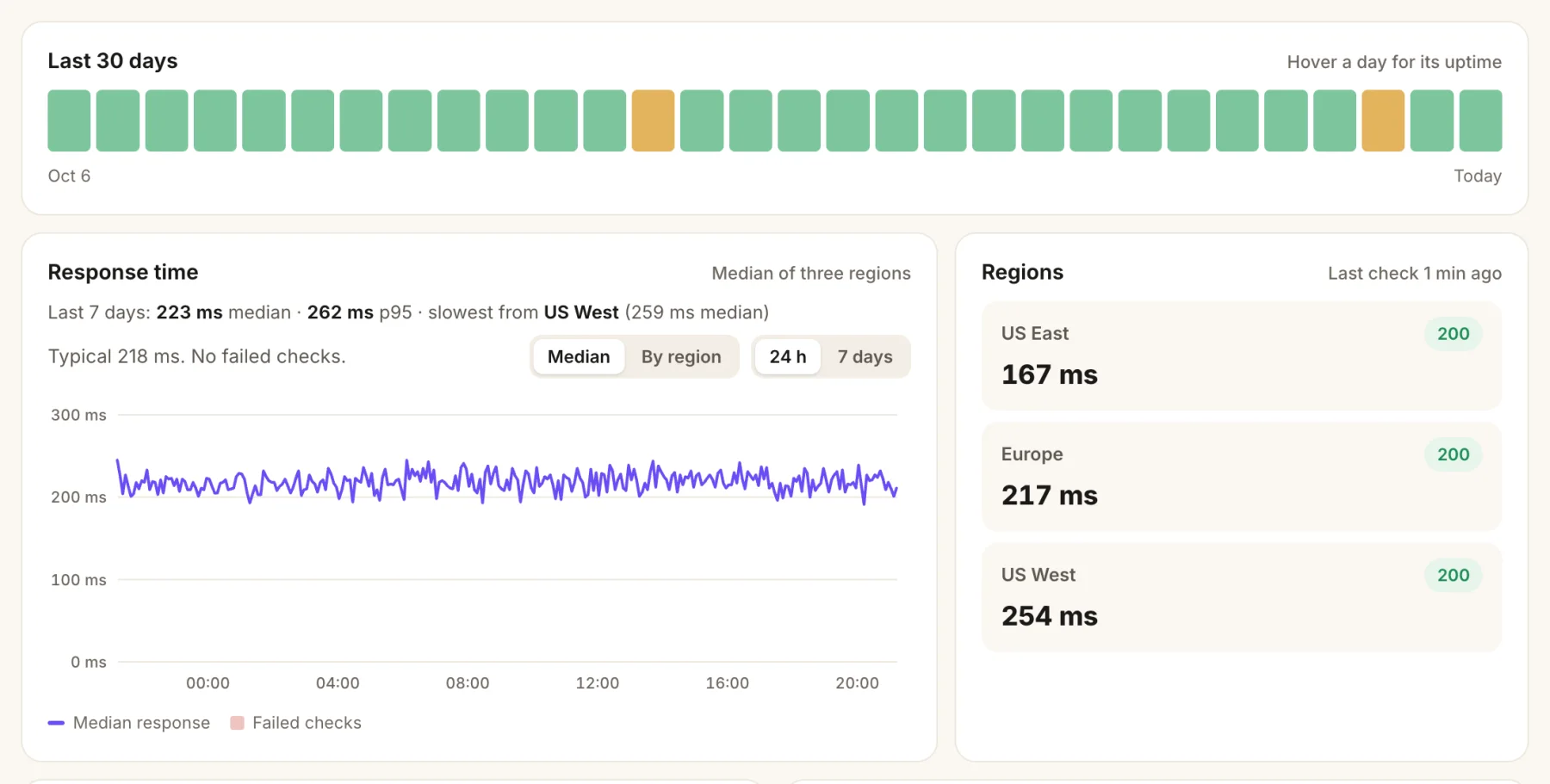
- Every day at a glance. Amber means a short outage that day.
- Response time, median and p95, and the slowest region.
- Three regions check your URL. An outage only counts when two agree.
Or ask your coding agent
Connect BugOtter to Claude Code, Cursor or Codex once over MCP. It signs in through your browser, read-only unless you allow changes. Then paste one line.
claude mcp add --transport http --scope user bugotter https://bugotter.com/api/mcpThen ask, in plain words:
Add the BugOtter script to the base layout of this Astro site with is:inline, and add a window.bo?.track goal to the newsletter form.
Set up the BugOtter ad-blocker proxy for this Astro site on our host, then switch the script to /_bo/bo.js.
Using BugOtter, which pages of this site got the most visits from search last week, and which have the worst LCP?
Cursor, VS Code, Codex and the rest have their own one-step setup at Docs: your agent (MCP). Every setup screen in BugOtter also has a Copy prompt for your agent button with your keys filled in.
Questions
Do I need is:inline on the script tag?
Yes, add it. Astro processes and bundles <script> tags it finds in components. is:inline tells Astro to leave this one exactly as written, with its src and data-app attribute, so the browser loads it straight from BugOtter (or from your proxy).
Does it count page changes with View Transitions?
Yes. With <ClientRouter /> on, Astro changes pages with history.pushState, which the script listens for. Astro also keeps an external head script that was already run, so the script runs once per visit and nothing is counted twice. Don't add data-astro-rerun to it.
My Astro site is fully static. What do I get?
Everything except server errors: analytics, goals, browser errors with breadcrumbs, Web Vitals from real visits, uptime, SSL and domain checks, a status page and deploy markers. There's no server code to send errors from, so you don't need a Sentry SDK at all.
Can Astro proxy the script itself?
Not reliably. Astro's redirects only redirect, Astro.rewrite() only serves pages from your own project, and Astro ignores any page or folder whose name starts with an underscore. Use your host's rewrites, which work for static and server sites alike.
Which Astro adapters does @sentry/astro support?
The Node runtime: @astrojs/node, and Vercel or Netlify serverless functions. It doesn't run on edge functions. On the Cloudflare adapter, Sentry's Cloudflare SDK is the one to use; the Cloudflare page here shows it.
Is there a status page for my Astro site?
Yes. Turn it on and it lives at bugotter.com/status/your-site, with uptime and incidents only. Pro can serve it from your own domain.
Sources
Checked Nov 4, 2026 against Astro's docs on scripts, view transitions and routing (the underscore rule), and Sentry's Astro guide and source map options. The enabled option is from the @sentry/astro 11.10 types. BugOtter isn't affiliated with Sentry or Astro.
Watch every app you ship, from one calm list.
14 days of everything, no card needed. Plans from $10 a month, billed yearly.