
React Router and Remix integration
React Router (Remix) analytics, error tracking and uptime
BugOtter works with React Router v7 framework mode and Remix v2. One script tag in app/root.tsx gives you cookieless analytics and browser errors. @sentry/react-router, pointed at your BugOtter DSN, catches errors in loaders and actions. Uptime and a status page start when you add the URL.
- 1 tagin app/root.tsx
- v7 or Remix v2both work
- 3 regionsuptime checks
What BugOtter gives a React Router app
Analytics with no banner
One tag in the rootLayout. Links,navigate()and<Form>are counted.Loader and action errors
@sentry/react-routerwith your BugOtter DSN. The script covers the browser.Past ad blockers
A resource route at/_bo/*forwards three paths from your own domain.
Analytics: the script in your root Layout
Add the script to app/root.tsx
The
Layoutexport renders the document for every route, including your error boundary. Put the tag in its<head>. It loads after the page, sets no cookies and needs no banner.app/root.tsx // app/root.tsx import { Links, Meta, Scripts, ScrollRestoration } from "react-router"; export function Layout({ children }: { children: React.ReactNode }) { return ( <html lang="en"> <head> <meta charSet="utf-8" /> <meta name="viewport" content="width=device-width, initial-scale=1" /> <Meta /> <Links /> <script defer src="https://bugotter.com/bo.js" data-app="YOUR_APP_ID" /> </head> <body> {children} <ScrollRestoration /> <Scripts /> </body> </html> ); }Navigation is counted on its own
Links and
navigate()change pages withhistory.pushState. The script follows that and the back button, so each new path is a page view, with time on page, scroll depth and Web Vitals for each. Keep signed-in pages out withdata-exclude="/dashboard".Goals from components
Call
window.bo?.track()from an event handler. The?.covers the moment before the deferred script has loaded. Forms, downloads and outbound links need no code.app/components/upgrade-button.tsx // app/components/upgrade-button.tsx export function UpgradeButton({ plan }: { plan: string }) { return ( <button onClick={() => window.bo?.track("upgrade_click", { plan })}> Upgrade </button> ); }Using TypeScript? Declare
window.boonce, sotrack()type-checks:app/bo.d.ts declare global { interface Window { bo?: { track(name: string, props?: Record<string, string | number | boolean>): void; visitorId(): string | null; }; } } export {};
npx bugotter init --token bo_… writes BUGOTTER_DSN, BUGOTTER_PROJECT and BUGOTTER_KEY to .env.local and prints the tag. It doesn't edit root.tsx, so paste the tag as above.
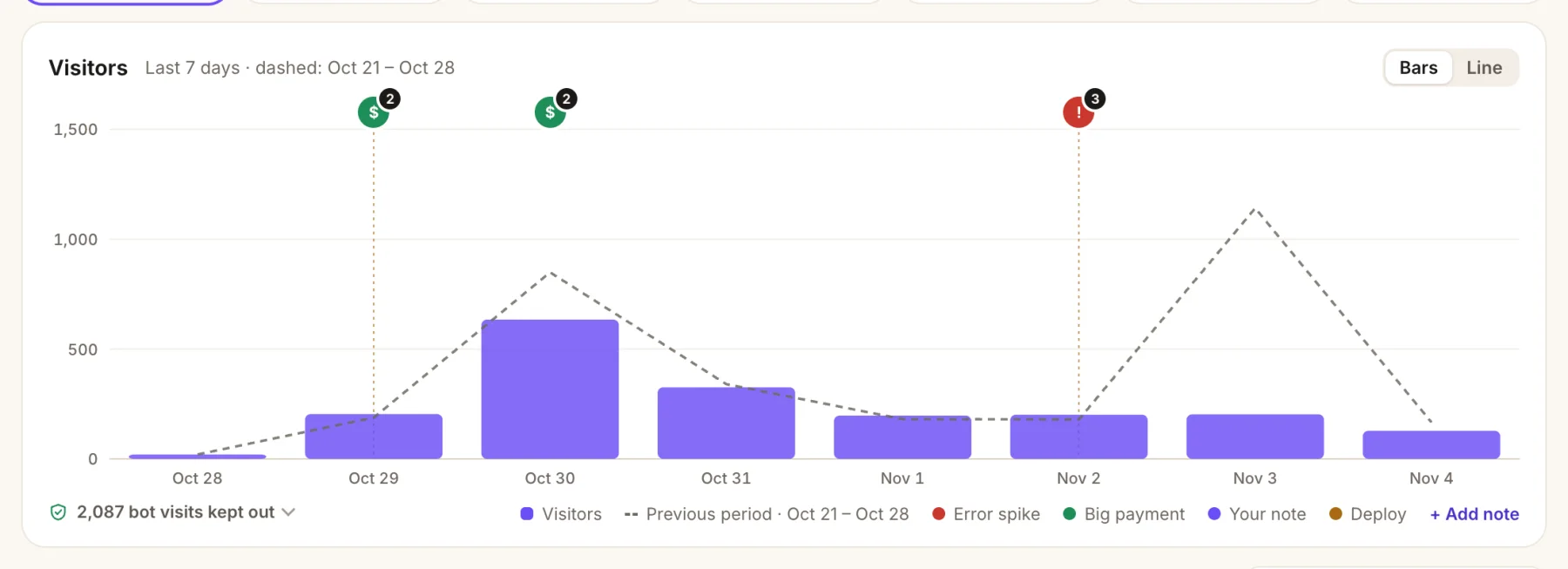
- Payments on the chart. A green marker shows the day a big payment came in.
- Error spikes, too. A red marker lines up a bad day with the error behind it.
- Last period, dashed, so a drop or a launch spike is obvious at a glance.
- Bots kept out of every number, with the count one click away.
Get past ad blockers with a resource route
A resource route on your own domain forwards three paths to BugOtter, and nothing else.
20–40%
of visitors are dropped by ad blockers for most analytics
First, declare the route in app/routes.ts, so the _bo path stays literal:
// app/routes.ts
import { type RouteConfig, index, route } from "@react-router/dev/routes";

export default [
  index("routes/home.tsx"),
  route("_bo/*", "bo-proxy.ts"), // outside routes/, so file-based routing ignores it
] satisfies RouteConfig;
Then the route itself: a loader and an action that forward to BugOtter.
// app/bo-proxy.ts — a resource route: a loader and an action, no component
import type { LoaderFunctionArgs } from "react-router";

const BO = "https://bugotter.com";
const KEY = process.env.BUGOTTER_PROXY_KEY;
const TARGET: Record<string, string> = {
  "bo.js": `${BO}/bo.js`,
  "api/collect": `${BO}/api/collect?via=${KEY}`,
  "api/errors": `${BO}/api/errors?via=${KEY}`,
};

async function forward({ request, params }: LoaderFunctionArgs) {
  const url = TARGET[params["*"] ?? ""];
  if (!url) return new Response("Not found", { status: 404 });
  const headers = new Headers();
  for (const h of ["content-type", "user-agent", "origin", "referer"]) {
    const v = request.headers.get(h);
    if (v) headers.set(h, v);
  }
  const res = await fetch(url, {
    method: request.method,
    headers,
    body: request.method === "POST" ? await request.text() : undefined,
  });
  return new Response(res.body, {
    status: res.status,
    headers: {
      "content-type": res.headers.get("content-type") ?? "text/plain",
      "cache-control": res.headers.get("cache-control") ?? "no-store",
    },
  });
}

export const loader = forward; // GET /_bo/bo.js
export const action = forward; // POST /_bo/api/collect and /_bo/api/errorsSet BUGOTTER_PROXY_KEY on the server, then change the tag to src="/_bo/bo.js". Using flatRoutes()? Spread it into the array and add the same route() line next to it.
Check it once: curl -sI https://yourapp.com/_bo/bo.js should answer 200. Your proxy key is on the app's Traffic tab in BugOtter. Keep the ?via= part: it proves visits came through your proxy, and it only lives in server config, never in the page.
Errors: @sentry/react-router with your BugOtter DSN
Browser errors already come from the script. For loaders, actions and server rendering, use Sentry's React Router SDK and point it at BugOtter. No Sentry account, wizard or Vite plugin needed.
Install the SDK
terminal npm install @sentry/react-routerInit it before the server starts
instrument.server.mjs // instrument.server.mjs (project root) import * as Sentry from "@sentry/react-router"; Sentry.init({ dsn: process.env.BUGOTTER_DSN, dataCollection: { userInfo: false, cookies: false, httpBodies: [], databaseQueryData: false }, });Load it before anything else when the server starts. The same
package.jsonalso uploads source maps after the build:package.json // package.json "scripts": { "build": "react-router build && npx bugotter sourcemaps build/client --delete", "start": "NODE_OPTIONS='--import ./instrument.server.mjs' react-router-serve ./build/server/index.js" }The
dataCollectionline is for SDK v11; on v10 usesendDefaultPii: false. Leave outtracesSampleRate: BugOtter keeps errors, not traces.Report errors from loaders and actions
app/entry.server.tsx // app/entry.server.tsx (run `npx react-router reveal` if you don't have one) import * as Sentry from "@sentry/react-router"; // On Vercel or Netlify, where you can't set NODE_OPTIONS, import it here instead: // import "../instrument.server.mjs"; export const handleError = Sentry.createSentryHandleError({ logErrors: false });Skip
entry.client.tsxchanges: the script covers the browser, and the Sentry browser SDK would report the same errors twice.
Kept
- Exceptions and
captureMessageevents, grouped into issues - Release, environment, the request path and runtime
- Navigation and failed-request breadcrumbs
- Your user id, hashed (never stored raw)
Accepted, then dropped
- Performance traces and spans
- Session replays and profiles
- Sessions, logs and metrics
- Console breadcrumbs and click text
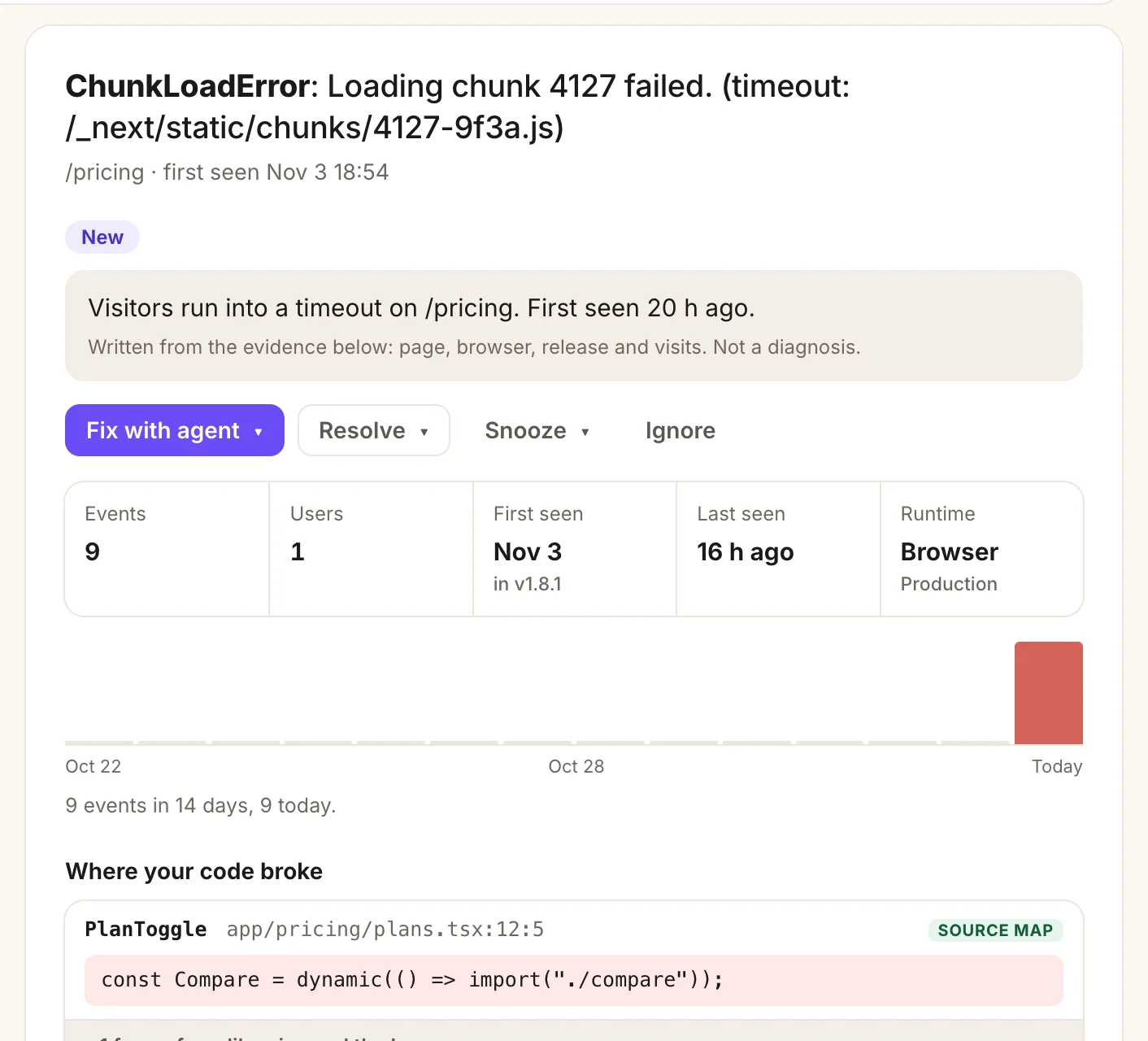
- A plain summary written from the evidence: page, browser, release and visits.
- Fix with agent hands the whole issue to Claude Code, Cursor or Codex.
- Where your code broke, mapped back to your file and line with your source maps.
Source maps from build/client
In vite.config.ts, set build: { sourcemap: "hidden" }. Vite writes the maps with no link to them in your scripts.
- Upload: the
buildscript above uploads every map inbuild/client(bundles load from/assets/…). - Private:
--deleteremoves them before deploy, so your source stays private. - Keys and release: the CLI reads
BUGOTTER_PROJECTandBUGOTTER_KEYfrom the build environment and tags the upload with the commit.
Details in the source maps guide.
Uptime, a status page and deploys
3 regions
check your app from the moment you add the URL
Add a resource route that touches your database and check it too, so a broken connection shows up as an outage:
// add route("api/health", "routes/api.health.ts") to app/routes.ts
import { db } from "~/db.server";

export async function loader() {
  await db.execute("select 1");
  return Response.json({ ok: true });
}
In BugOtter, expect the JSON value ok to be true.
- Deploys on Vercel: automatic once connected.
- Deploys on Netlify: add your app's deploy webhook as a Deploy succeeded notification.
- Deploys on Fly, Railway or your own server: run
npx bugotter deployas the last step. - Status page: at
bugotter.com/status/your-app, with a README badge. Pro can use your own domain.
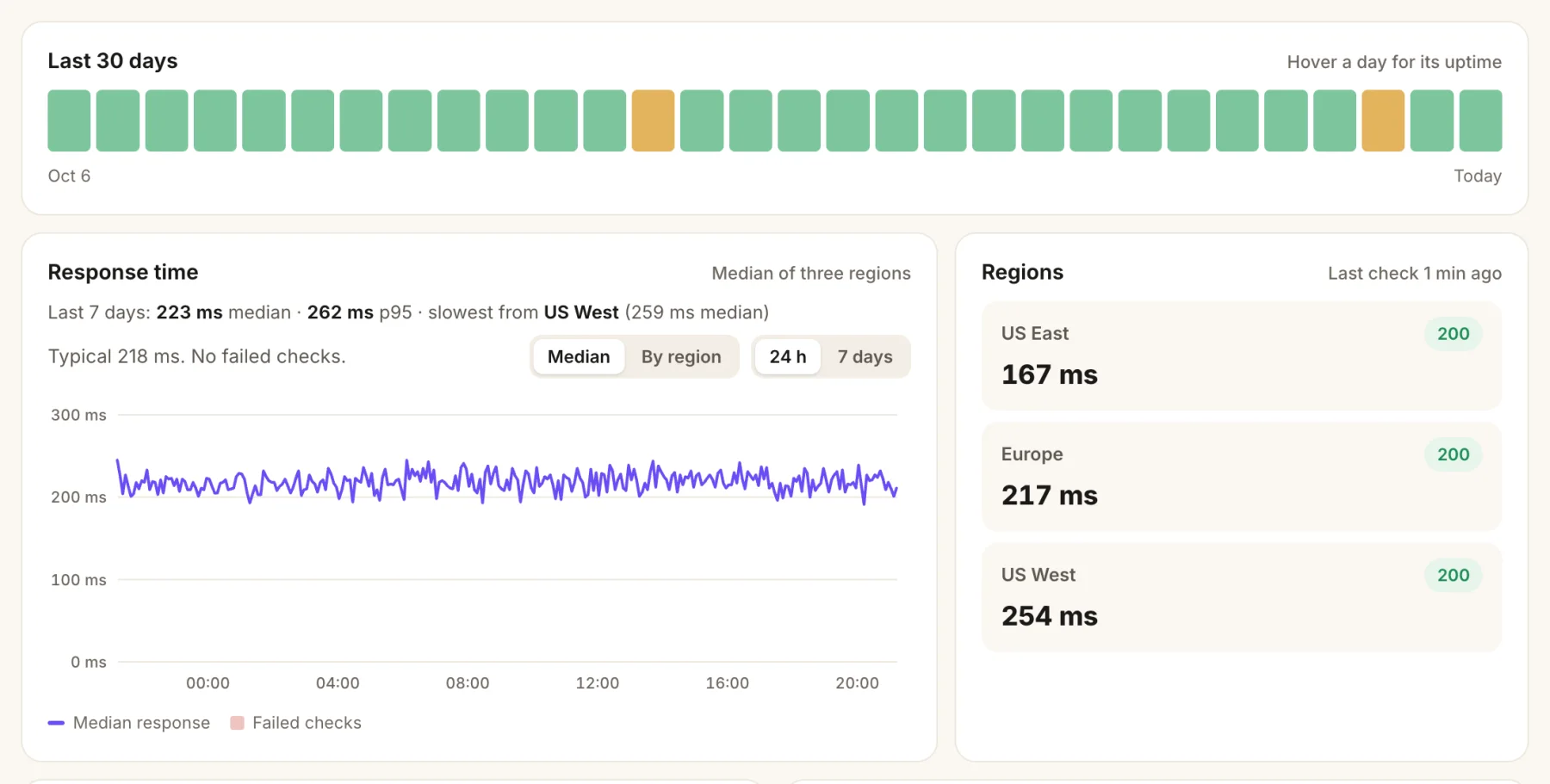
- Every day at a glance. Amber means a short outage that day.
- Response time, median and p95, and the slowest region.
- Three regions check your URL. An outage only counts when two agree.
Or ask your coding agent
Connect BugOtter to Claude Code, Cursor or Codex once over MCP. It signs in through your browser, read-only unless you allow changes. Then paste one line.
claude mcp add --transport http --scope user bugotter https://bugotter.com/api/mcpThen ask, in plain words:
Add BugOtter to this React Router app: the script in app/root.tsx, @sentry/react-router on the server with my BugOtter DSN, and source map upload from build/client.
Add the BugOtter ad-blocker proxy as a resource route at /_bo/* in app/routes.ts and switch the script to /_bo/bo.js.
Using BugOtter, find the loader errors that started after our last deploy and fix the top one.
Cursor, VS Code, Codex and the rest have their own one-step setup at Docs: your agent (MCP). Every setup screen in BugOtter also has a Copy prompt for your agent button with your keys filled in.
Questions
Is this for React Router v7 or Remix v2?
Both. React Router v7 in framework mode is what Remix v2 became, and the script tag goes in app/root.tsx in either. For server errors, use @sentry/react-router on React Router v7 and @sentry/remix on Remix v2. Remix v2 has no routes.ts, so name the proxy file app/routes/[_bo].$.ts instead: the brackets keep the underscore part of the URL.
Does BugOtter count client-side navigation?
Yes. React Router changes pages with history.pushState, which the script listens for, along with the back button. Each new path is one page view. navigate(to, { replace: true }) replaces the entry instead, so it isn't counted as a new page view. A change of search params alone isn't a new page view either.
Are <Form> submissions counted?
Yes. React Router's <Form> renders a real form and fires a real submit event, which the script counts as Form: <name>. It never reads what people type. Give a form a clear name with data-bo-name="signup", or skip one with data-bo-skip.
Why not app/routes/_bo.$.ts?
In file-based route names, a leading underscore makes a pathless layout, so _bo wouldn't be part of the URL. Declaring the route in routes.ts keeps the path literal, and keeping the file outside app/routes stops flatRoutes() from picking it up as a second route.
Does the proxy work in SPA mode?
No. With ssr: false there's no server to run a resource route. Put the three paths in your host's rewrites instead: Netlify, Vercel or a Cloudflare Pages Function.
Where is the status page?
At bugotter.com/status/your-app once you turn it on, with uptime and incidents only. Pro can serve it from your own domain.
Sources
Checked Nov 4, 2026 against React Router's docs on routes.ts and file route conventions, and Sentry's React Router manual setup. BugOtter isn't affiliated with Sentry, Shopify or the React Router team.
Watch every app you ship, from one calm list.
14 days of everything, no card needed. Plans from $10 a month, billed yearly.