

Dodo Payments integration
Dodo Payments analytics: MRR, churn and revenue by traffic source
BugOtter reads your Dodo Payments business and shows what each app earns, net of the tax Dodo collects: MRR and how it moved, revenue after refunds, trials, cancellations and failed payments. Pass the visit id in your checkout's metadata and each sale is linked to the traffic source that brought it.
- Net of taxrevenue and MRR
- Test modedodo_test_ keys
- Every 15 minsync
Three things to know
Net of tax
Dodo Payments is the merchant of record. Its tax is left out of both revenue and MRR.Sales by source
Add the visit id to the checkout's metadata. One-time sales and renewals both keep their source.Try it in test mode
Adodo_test_key reads Dodo's test server and is labelled Test mode.
Connect Dodo Payments
Copy one key. Test keys work the same way.
Create a read-only API key
In Dodo Payments, open Developer → API Keys → Add API key. Set Read on Products, Subscriptions, Payments and Refunds, and leave the rest on None.Live keydodo_live_…Paste it on Revenue
BugOtter checks that the key can read each of the four lists, then stores it encrypted.Let the first sync run
Every product and subscription, and 90 days of payments and refunds.Match products to apps
BugOtter suggests an app for each product from its name. Confirm it once.
- Live keys start with
dodo_live_, test keys withdodo_test_. Older keys without a prefix work too. - Only the key's last 4 characters are shown. A test key is labelled Test mode.
- If a permission is missing, BugOtter names it when you connect, not on the first sync.
Every 15 min
After the first sync, it repeats every 15 minutes.
Key prefixes, permissions, API hosts and request limits checked Nov 20, 2026 in Dodo Payments' API reference.
What you'll see
One app's revenue in the live demo. Every provider feeds the same view.
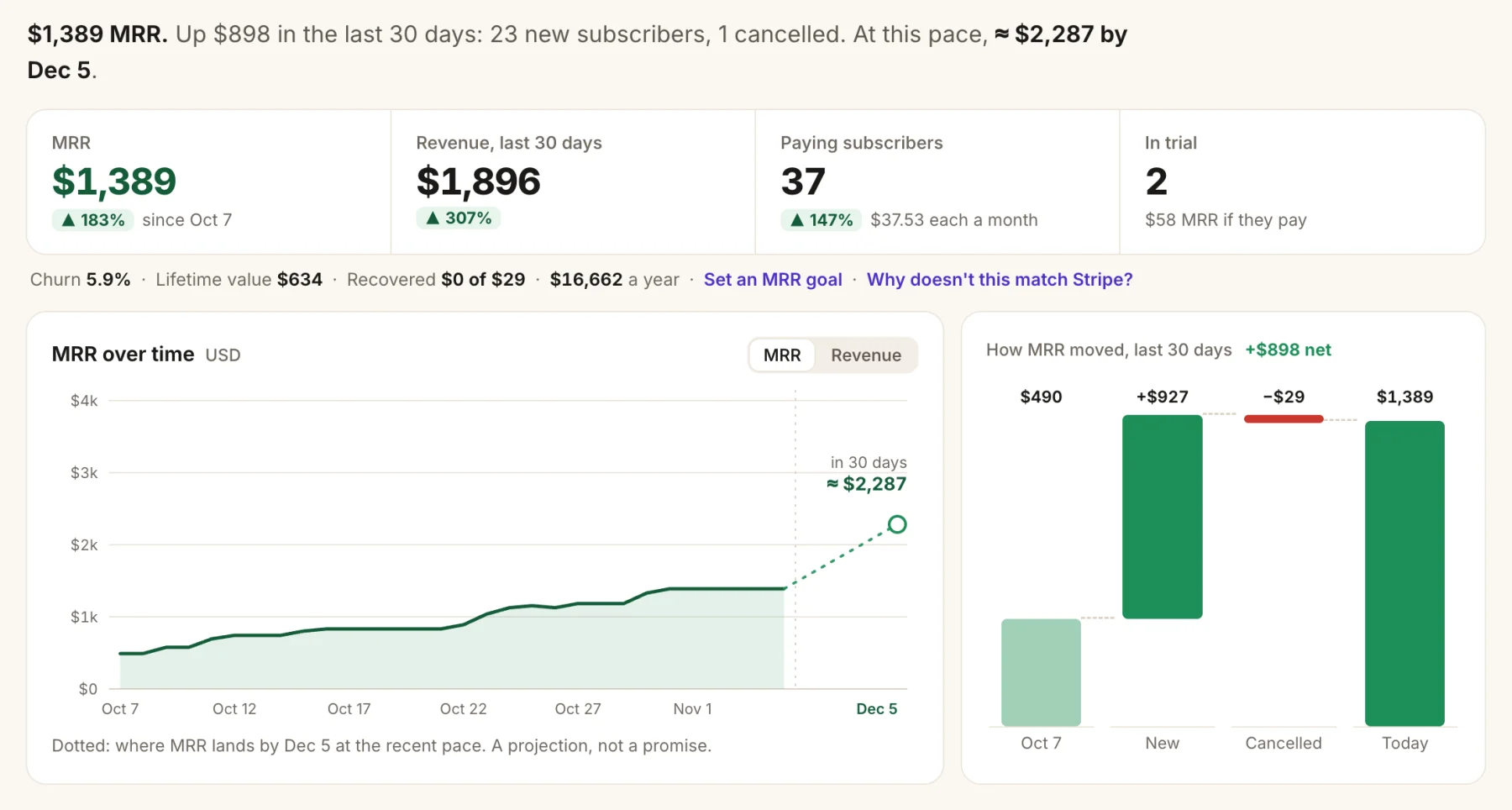
- MRR per app, net of tax.
- How it moved: new, upgrades, downgrades and cancellations.
- A 30-day forecast if the last 30 days repeat.
- Trials, and what they're worth if they pay.
- Revenue after refunds, with each refund counted on the day it happened. A lost chargeback counts as a full refund.
- Leaving soon: subscriptions set to cancel at the next billing date.
- Failed payments. Two or more on an app in 7 days open an issue and alert you. One declined card doesn't, and a payment that goes through later doesn't count.
- Customers, anonymous: paying, cancelling or at risk, lifetime paid, and first-visit source.
- Revenue per traffic source for sales whose checkout carried the visit id.
Link Dodo Payments sales to traffic sources
Add the visit id to the checkout's metadata. BugOtter reads it from the payment.
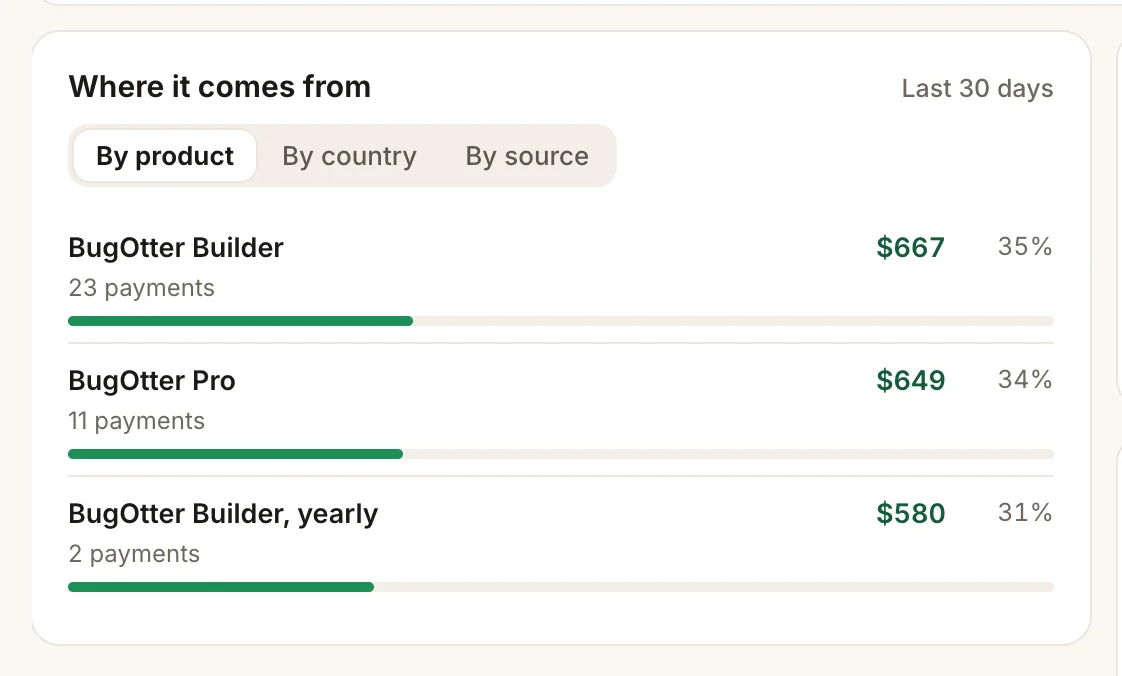
- By source: revenue per traffic source, for linked sales.
- By product, with payments and share of revenue.
First, read the visit id in the browser and send it with your checkout request:
// In the browser, before you start the checkout
const visitorId = window.bo?.visitorId?.(); // "bo_…" or undefined

await fetch("/api/checkout", {
  method: "POST",
  headers: { "Content-Type": "application/json" },
  body: JSON.stringify({ productId, visitorId }),
});
Then add it to the checkout's metadata as bugotter_visitor_id:
// On your server: create the Dodo Payments checkout session
const key = process.env.DODO_PAYMENTS_API_KEY!;
const base = key.startsWith("dodo_test_")
  ? "https://test.dodopayments.com"
  : "https://live.dodopayments.com";

const res = await fetch(`${base}/checkouts`, {
  method: "POST",
  headers: { Authorization: `Bearer ${key}`, "Content-Type": "application/json" },
  body: JSON.stringify({
    product_cart: [{ product_id: productId, quantity: 1 }],
    return_url: "https://yourapp.com/thanks",
    ...(typeof visitorId === "string" && visitorId
      ? { metadata: { bugotter_visitor_id: visitorId } }
      : {}),
  }),
});
const session = await res.json(); // send the customer to the checkout it returnsThat's your app's existing checkout call with one more field. Using the Dodo Payments SDK? Pass the same metadata object to its checkout call.
By default the visit id lasts for the browser tab, so someone who comes back days later in a new tab starts a new visit.
How MRR is counted for Dodo Payments
Yearly ÷ 12
What each renewal charges before tax, turned into a month.
- What counts: active and past-due subscriptions, and ones set to cancel until they end. Trials count once they pay. On hold, paused, cancelled and expired don't.
- Tax: left out of both MRR and revenue. It's Dodo's to pay as merchant of record, not your income.
- Currencies stay separate, never converted.
Curious how annual plans move the number? The MRR calculator shows it.
Read-only toward Dodo Payments
BugOtter never creates checkouts, issues refunds, cancels subscriptions or emails your customers. A key with Read only can't do any of that, and BugOtter only calls Dodo's list and read endpoints.
Connecting and disconnecting are only in the app, never through the MCP server. Disconnecting deletes the Dodo Payments data BugOtter copied; delete the key in Dodo Payments too if you're done.
Dodo Payments next to the other payment providers
BugOtter reads five providers. Here's what each one gives you.
| Feature | Stripe | Paddle | Polar | Creem | Dodo Payments |
|---|---|---|---|---|---|
| Access | |||||
| The key you give BugOtter | YesRestricted key, Read only | YesAPI key, Read on 4 permissions | YesOrganization token, read scopes | YesAPI key, Read on 3 resources | YesAPI key, Read on 4 resources |
| Revenue | |||||
| Revenue after refunds | Yes | Yes | Yes | Yes | Yes |
| MRR and how it moved | Yes | Yes | Yes | Yes | Yes |
| Trials and when they end | Yes | Yes | Yes | Yes | Yes |
| Cancellations scheduled (leaving soon) | Yes | Yes | Yes | Yes | Yes |
| Why customers cancelled | Yes | No | Yes | No | No |
| Refunds on the day they happened | Yes | Yes | PartlyWith refunds:read | PartlyDated by the payment | Yes |
| Failed payment alerts | Yes | Yes | No | Yes | Yes |
| Linking and testing | |||||
| Revenue by traffic source | YesPayment Links: automatic. Your checkout: metadata | YesCheckout custom data, one-time sales too | YesCheckout metadata | PartlySubscriptions, via checkout metadata | YesCheckout metadata, one-time sales too |
| Test mode | Yesrk_test_ keys, marked Test mode | YesSandbox keys, marked Test mode | YesSandbox tokens, marked Test mode | Yescreem_test_ keys, marked Test mode | Yesdodo_test_ keys, marked Test mode |
Questions
Is a Dodo Payments key safe to give BugOtter?
Yes, when you make it read-only. In Dodo Payments, add an API key with Read on Products, Subscriptions, Payments and Refunds, and None on everything else. That key can't create checkouts, refund or cancel anything. Coding agents can't reach the connection over MCP. Delete the key in Dodo Payments whenever you like.
Does BugOtter count the tax Dodo Payments collects?
No. Dodo Payments is the merchant of record and collects the tax. BugOtter subtracts the tax on each payment from revenue, and counts MRR from what each renewal charges before tax.
Why does a big store take a while to fill in?
Dodo's payment list doesn't include tax or the product, so BugOtter reads each new payment once in full. Dodo allows a limited number of requests a minute for your whole business, shared with your own app, so BugOtter reads at most 150 new payments per sync, newest first. A store with more than that in 90 days fills in over the next syncs, 15 minutes apart.
Can I try it in test mode?
Yes. A dodo_test_ key is read from Dodo's test server and the connection is labelled Test mode. When you add a live key, the test one pauses and its test data leaves your numbers.
Are one-time payments linked to traffic sources?
Yes. Dodo payments carry the metadata you set at checkout, so one-time sales and subscription payments are both linked when the checkout passed the visit id.
Is there a size limit?
BugOtter reads up to 10,000 products, subscriptions, payments or refunds per list. A bigger store gets a clear sync error rather than quietly missing numbers. Tell us and we'll raise it.
Know which post brought each Dodo Payments customer.
14 days of everything, no card needed. Plans from $10 a month, billed yearly.