

Paddle integration
Paddle analytics: MRR, churn and revenue by traffic source
BugOtter reads your Paddle Billing account and shows what each app earns, net of the tax Paddle collects: MRR and how it moved, revenue after refunds, trials, cancellations and failed payments. Pass the visit id as checkout custom data and every sale, one-time or subscription, is linked to the traffic source that brought it.
- Read-only4 Read permissions
- Net of taxrevenue and MRR
- Every 15 minsync
Three things to know
Net of tax
Paddle is the merchant of record. Its tax is subtracted from revenue, refunds and MRR.Every sale by source
Paddle copies checkout custom data to every transaction, so one-time sales and renewals keep their source.Sandbox works
Apdl_sdbx_key reads Paddle's sandbox and is labelled Test mode.
Connect Paddle
One read-only key. Sandbox keys work the same way.
Create a read-only API key
In Paddle, open Developer tools → Authentication → API keys → New API key. Give it Read on Products, Transactions, Subscriptions and Adjustments, nothing else.Live keypdl_live_apikey_…Paste it on Revenue
BugOtter checks the key's permissions and names any that are missing, then stores it encrypted.Let the first sync run
Every product and live subscription, and 90 days of transactions and refunds.Match products to apps
BugOtter suggests an app for each product from its name. Confirm it once.
- Paddle keys expire (90 days by default, a year at most). Pick a long expiry; when it runs out, BugOtter asks for a new key.
- Only the key's last 4 characters are shown. A sandbox key is labelled Test mode.
- Once matched, that product's revenue, MRR and failed payments land on the right app.
Every 15 min
After the first sync, it repeats every 15 minutes.
Key format, permissions, hosts and fields checked Nov 13, 2026 in Paddle's API reference.
What you'll see
One app's revenue in the live demo. Paddle, Stripe, Polar and Creem all feed the same view.
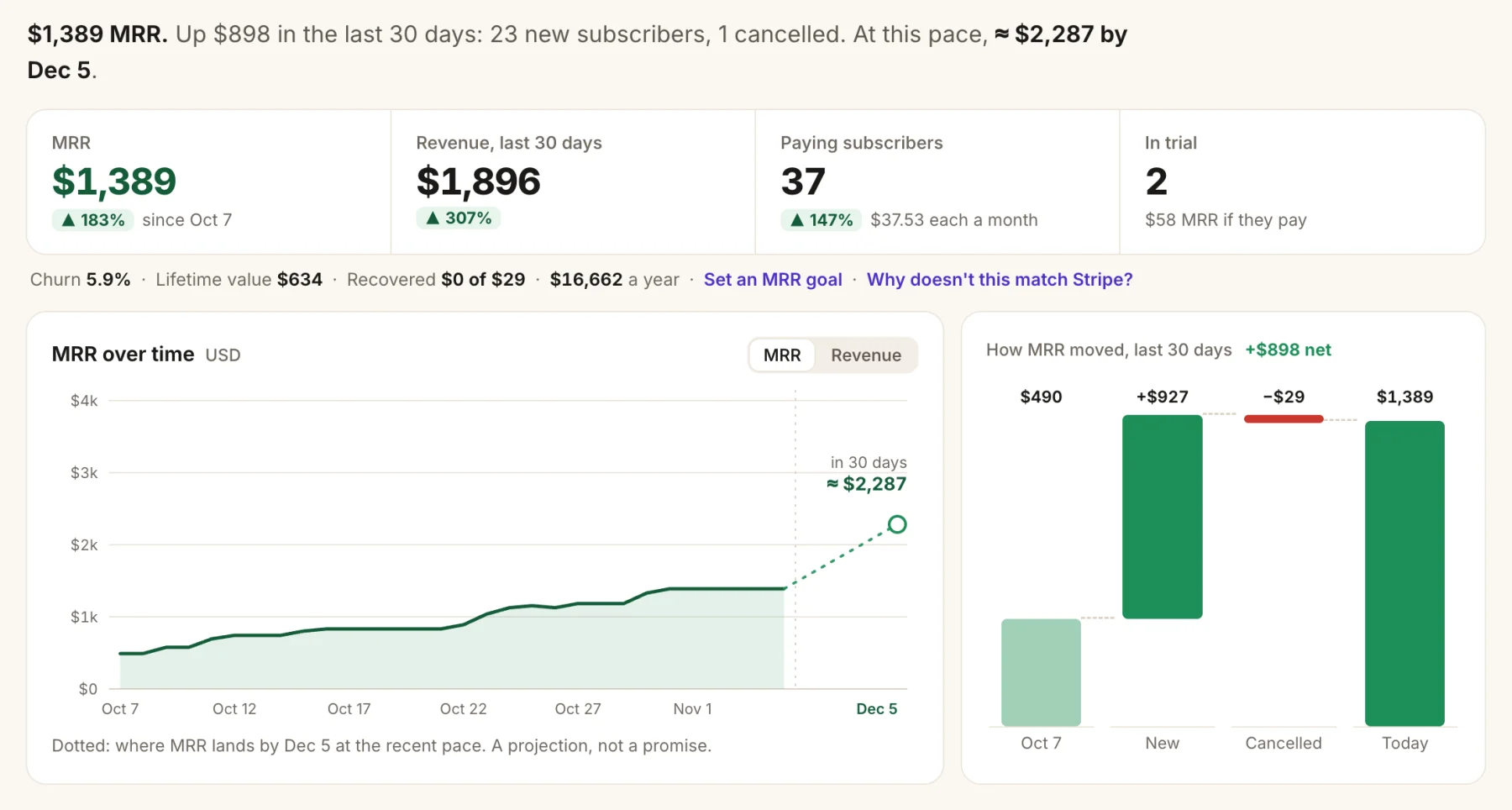
- MRR per app, net of tax.
- How it moved: new, upgrades, downgrades and cancellations.
- A 30-day forecast if the last 30 days repeat.
- Trials, and what they're worth if they pay.
- Revenue after refunds, from paid and completed transactions. Approved refunds and chargebacks are subtracted on the day they happened.
- Leaving soon: subscriptions with a scheduled cancellation, and the day they end.
- Failed payments. Two or more failed payments on an app in 7 days open an issue and alert you. One declined card doesn't (it's usually an expired card the provider retries), and a payment that goes through later doesn't count.
- Customers, anonymous: paying, cancelling or at risk, lifetime paid, and first-visit source.
- Revenue per traffic source for every sale whose checkout carried the visit id.
Link Paddle sales to traffic sources
Add the visit id to the checkout's custom data. Paddle copies it to the subscription and every transaction after.
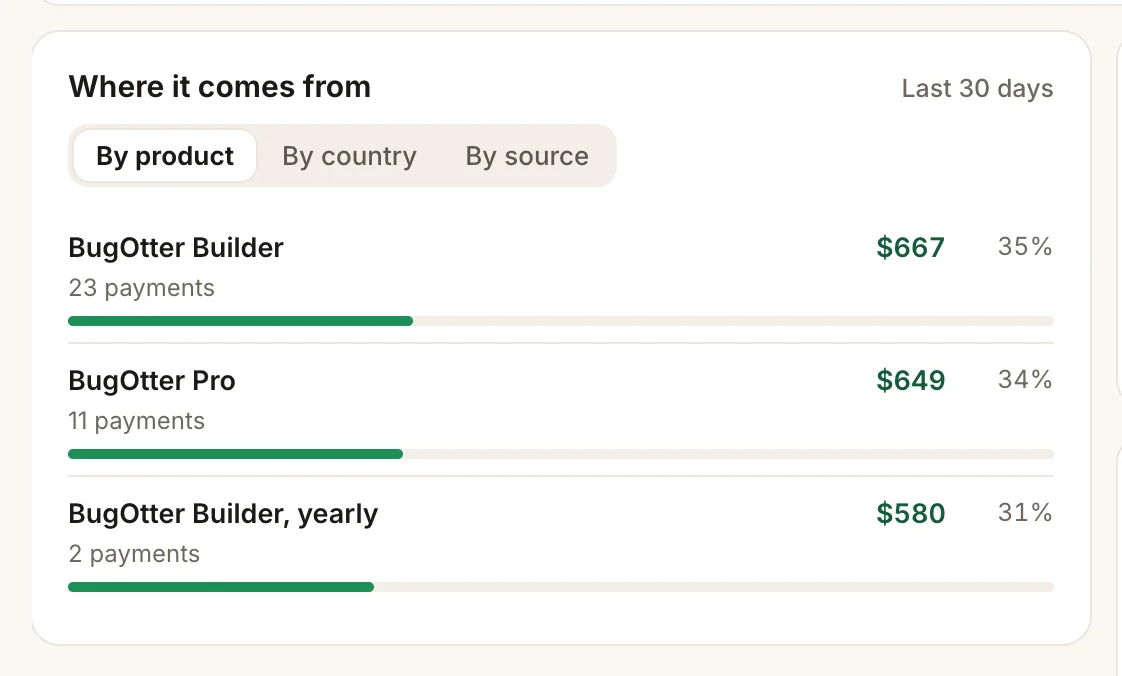
- By source: revenue per traffic source, for linked sales.
- By product, with payments and share of revenue.
With Paddle.js, it's one option on the checkout you already open:
// In the browser, where you open Paddle's checkout
const visitorId = window.bo?.visitorId?.(); // "bo_…" or undefined

Paddle.Checkout.open({
  items: [{ priceId: "pri_…", quantity: 1 }],
  ...(visitorId ? { customData: { bugotter_visitor_id: visitorId } } : {}),
});
Creating transactions on your server instead? Send the visit id from the browser and add it as custom_data:
// Or on your server, if you create the transaction there
await fetch("https://api.paddle.com/transactions", {
  method: "POST",
  headers: { Authorization: `Bearer ${process.env.PADDLE_API_KEY}`, "Content-Type": "application/json" },
  body: JSON.stringify({
    items: [{ price_id: "pri_…", quantity: 1 }],
    ...(typeof visitorId === "string" && visitorId
      ? { custom_data: { bugotter_visitor_id: visitorId } }
      : {}),
  }),
});Leave the field out when there's no visit id: Paddle rejects empty custom data. By default the visit id lasts for the browser tab, so someone who comes back days later in a new tab starts a new visit.
How MRR is counted for Paddle
Yearly ÷ 12
The subscription's recurring items, turned into a month.
- What counts: active and past-due subscriptions, and ones with a scheduled cancellation until they end. Trials count once they pay. Paused and canceled don't.
- Amount: each recurring item's price times quantity. When a price includes tax, or a discount is running, the subscription's last payment net of tax is used instead, so MRR matches what actually comes in.
- Tax: left out of MRR, revenue and refunds. It's Paddle's to pay as merchant of record, not your income.
- Currencies stay separate, never converted.
Curious how annual plans move the number? The MRR calculator shows it.
Read-only toward Paddle
BugOtter never creates transactions, issues refunds, cancels subscriptions or emails your customers. With a key limited to the four Read permissions, Paddle itself enforces that.
Connecting and disconnecting are only in the app, never through the MCP server. Disconnecting deletes the Paddle data BugOtter copied; revoke the key in Paddle too if you're done.
Paddle next to the other payment providers
BugOtter reads five providers. Here's what each one gives you.
| Feature | Stripe | Paddle | Polar | Creem | Dodo Payments |
|---|---|---|---|---|---|
| Access | |||||
| The key you give BugOtter | YesRestricted key, Read only | YesAPI key, Read on 4 permissions | YesOrganization token, read scopes | YesAPI key, Read on 3 resources | YesAPI key, Read on 4 resources |
| Revenue | |||||
| Revenue after refunds | Yes | Yes | Yes | Yes | Yes |
| MRR and how it moved | Yes | Yes | Yes | Yes | Yes |
| Trials and when they end | Yes | Yes | Yes | Yes | Yes |
| Cancellations scheduled (leaving soon) | Yes | Yes | Yes | Yes | Yes |
| Why customers cancelled | Yes | No | Yes | No | No |
| Refunds on the day they happened | Yes | Yes | PartlyWith refunds:read | PartlyDated by the payment | Yes |
| Failed payment alerts | Yes | Yes | No | Yes | Yes |
| Linking and testing | |||||
| Revenue by traffic source | YesPayment Links: automatic. Your checkout: metadata | YesCheckout custom data, one-time sales too | YesCheckout metadata | PartlySubscriptions, via checkout metadata | YesCheckout metadata, one-time sales too |
| Test mode | Yesrk_test_ keys, marked Test mode | YesSandbox keys, marked Test mode | YesSandbox tokens, marked Test mode | Yescreem_test_ keys, marked Test mode | Yesdodo_test_ keys, marked Test mode |
Questions
Is a Paddle key safe to give BugOtter?
Yes, when you make it read-only. Create a new API key in Paddle with Read on Products, Transactions, Subscriptions and Adjustments and nothing else. That key can't create transactions, refund or cancel anything. BugOtter checks the key's permissions when you connect it and names any that are missing. Coding agents can't reach the connection over MCP.
Does BugOtter count the tax Paddle collects?
No. Paddle is the merchant of record and collects the tax. BugOtter takes what the customer paid after discounts and credits, and subtracts the tax Paddle reports on each transaction, for both revenue and MRR. Refunds are counted without the tax they give back.
Are Paddle's fees subtracted?
No. Revenue is what customers paid, net of tax, the same as for Stripe and the other providers. Fees are a cost: add them under Running costs on the app's Revenue tab to see profit.
My key stopped working. Why?
Paddle API keys expire, after 90 days by default and a year at most. When yours does, the connection says it needs a new key. Make one with the same permissions and paste it in.
Can I use an older Paddle key?
Keys made before May 2025 can't be limited to reading, so BugOtter doesn't accept them. Make a new key with the four Read permissions.
Can I try it in the sandbox?
Yes. A sandbox key (pdl_sdbx_…) reads Paddle's sandbox API and labels the connection Test mode. When you add a live key, the sandbox one pauses and its test data leaves your numbers.
Does it work with Paddle Classic?
No, only Paddle Billing, which everyone who signed up after August 2023 has. Classic is a different API.
Can I connect more than one Paddle account?
Yes. Each Paddle account needs its own read-only key. Give each one a name and the app it sells, and its products go to that app on their own. Each account syncs and disconnects separately.
Know which post brought each Paddle customer.
14 days of everything, no card needed. Plans from $10 a month, billed yearly.